
Brightpearl Users: AfterShip is the Shippo Alternative for Mid-Market Logistics Managers


You've invested in Brightpearl to bring order to your inventory, sales, and accounting. But if your team is still wrestling with CSVs for returns, manually answering WISMO tickets, and using Shippo to just print labels, you're fighting fires in the last mile and leaving the ROI from your new ERP on the table.
That gap is the real story. Moving to Brightpearl is a signal of operational maturity: you outgrew running the business on spreadsheets and bolt-ons. Your shipping and post-purchase stack has to mature with it. The question isn't which tool prints a cheaper label. It's which Shippo alternative for a Brightpearl-powered business can match the sophistication of the system you just spent months implementing. (WISMO is shorthand for "where is my order?" support tickets.)
Why Your Shippo Workflow Is Breaking at Scale (And Holding Back Your Brightpearl ROI)
Shippo earned its place when you were smaller, and it's still a capable label tool. At 1,000-plus orders a month on a Brightpearl back office, the same simplicity that made it easy starts costing you in places your P&L will notice: carrier spend, support hours, and cost per return. Four breaking points tend to show up first.
- No rules-based carrier routing. Shippo compares rates, but rate comparison isn't a carrier strategy. You can't set a conditional rule like "if the SKU contains 'battery,' force Ground" or "if the order is over $250, ship 2-Day." AfterShip Shipping runs a real conditional rules engine across 100+ carriers, so carrier selection follows policy instead of a person clicking through every order.
- Post-purchase depth, not just presence. Shippo Pro now includes branded tracking pages, notification emails, and AI delivery estimates. What a scaling brand feels is the depth gap: how many update channels you get (email and SMS), how granular the status triggers are, how far the branding extends, and what the analytics actually tell you. Presence isn't parity.
- No self-service returns portal. Shippo prints return labels, on every plan. What it doesn't hand your shopper is a branded self-service portal with automated approvals, store credit, and exchange logic. That's the clearest class difference between a label tool and a returns experience, and it's exactly where your cost per return moves.
- Integration that carries more than a label. Neither tool sits in Brightpearl's connector directory; both connect through an API or an iPaaS bridge. The difference is the payload. With Shippo you sync a label. With AfterShip you can sync labels, tracking numbers, notification triggers, and RMA data back into Brightpearl, so the ERP stays your single system of record.
Read together, these aren't missing features. They're the difference between a tool built for basic operations and a platform built for the volume and carrier SLAs you're now managing.
AfterShip vs. Shippo for Brightpearl Users: A Quick Comparison
Before the deep dives, here's how the two line up on the criteria a mid-market ops manager actually weighs, from rules-based carrier automation to the Brightpearl integration method.
| Capability | AfterShip | Shippo |
|---|---|---|
| Multi-Carrier Rate Shopping | Yes (live rate comparison at rating/label) | Yes |
| Rules-Based Carrier Automation | Yes (conditional rules engine; up to 10 rules on Essentials/Pro, expanded on Enterprise) | No conditional carrier-routing engine |
| Branded Tracking Pages | Yes (deep customization + analytics) | Yes (on Pro tier) |
| Proactive Delivery Notifications | Yes (Email + SMS native from Essentials up) | Email notifications (Pro tier) |
| Self-Service Returns Portal | Yes (Essentials+); automation, exchanges, fraud rules, analytics on Premium | No self-service portal (sells return labels only) |
| AI Estimated Delivery Dates | Yes (Tracking Premium; 80%+ coverage, ~91% single / ~96% range; pre-purchase widget) | Yes (Pro tier, AI EDD) |
| Post-Purchase Analytics | Yes | Limited |
| Brightpearl Integration | API / iPaaS (Patchworks) / onboarding, custom but supported | API / iPaaS, custom but supported |
| Broader Tech Stack Integrations | Yes (Klaviyo on Tracking Pro/Premium; Gorgias free on Tracking + Returns; Shopify/Shopify Plus, TikTok Shop, ShipBob) | Carrier- and storefront-centric for label generation |
These aren't two versions of the same tool; they're two different classes of software, and the sections that follow show where that difference pays off.
Go Beyond Labels: How AfterShip Shipping Optimizes Your Fulfillment Operations
Replacing Shippo starts with the part Shippo does well: generating labels at discounted rates. AfterShip Shipping covers that table-stakes job across 100+ carriers, and it compares live carrier rates so you can land the cheapest qualifying service at the moment of label creation. The real reason to switch sits one layer above the label.
That layer is the automation rules engine. Instead of comparing rates and clicking through orders by hand, you compare live carrier rates and auto-select by rule. A rule is a plain IF/THEN: conditions on one side (shipping city, country, region, or postal code; SKU; item count; order value; shipping fees paid; package weight; requested service; or store), actions on the other (assign a carrier account and service, set package type and weight, define the ship-from location, or apply options like signature or Saturday delivery). Rules run on "meet all" (AND) or "meet any" (OR) logic and resolve by priority.
Here's what that looks like for a real catalog:
- Hazmat goes Ground. IF the SKU contains "battery," THEN assign Ground and the approved hazmat box.
- Cheapest service to the West Coast. IF the destination is a 9xxxx postal code, THEN compare rates and assign the lowest-cost qualifying service.
- VIP speed. IF the order total is over $250, THEN assign a 2-Day service.
Be clear-eyed about the ceiling. Essentials and Pro both cap you at 10 active rules, and that is a hard limit on those tiers. If your routing logic needs more than ten conditions, or you want to key rules off custom fields, that moves you to Enterprise, which expands the rule count and unlocks custom-field conditions. For most mid-market catalogs, ten well-ordered rules cover the bulk of daily volume, and they turn carrier selection from a per-order decision into a policy your Brightpearl-fed orders inherit automatically.
Cut WISMO Tickets by up to 75% with a Branded Post-Purchase Experience
The moment the label prints, the customer's anxiety clock starts. Every "where is my order?" message is a support cost and a small dent in the experience you're working to build. AfterShip Tracking attacks that on two fronts: it deflects the tickets before they're sent, and it turns the waiting period into a branded surface that earns repeat visits.
Deflection comes from proactive notifications. AfterShip Tracking sends native SMS and email updates from the Essentials tier up, covering the milestones customers care about: shipped, out for delivery, delivered, and exceptions. One honest caveat: SMS carries standard per-message costs and availability varies by country, so it is not unlimited free texting. Shippo Pro sends email notifications too, so this isn't about presence. It's about depth: AfterShip adds a second channel in SMS, finer status triggers, and a tracking page that reads across a 1,300+ carrier network.
Inspire Uplift cut 'where is my order?' support tickets by 75% with AfterShip Tracking.
The branded tracking page is where deflection becomes retention. Rather than bouncing customers to a generic carrier page, you host the status check on your own domain with your logo, marketing banners, and product recommendations, so the most-visited page in the post-purchase journey doubles as a storefront.
There's also a pre-purchase play. On Tracking Premium, an AI estimated delivery date (EDD) can appear right on the product page and at checkout. AfterShip's AI EDD covers at least 80% of deliveries, versus under 40% for most carrier-provided estimates, with roughly 91% accuracy on a single-date prediction and about 96% on a two-day range. ("Up to 95%" is a marketing ceiling, not the operational figure.) The model runs across 100+ major carriers. A credible delivery promise shown before the buy turns delivery confidence into conversion, not just post-purchase reassurance.
Turn Returns from a Cost Center into a Loyalty Driver
U.S. shoppers are expected to return nearly $850 billion in merchandise in 2025, about 15.8% of retail sales, which makes returns a margin lever rather than a back-office afterthought. Returns are where the label-tool model runs out. Shippo will print a return label; it won't give your shopper a self-service experience or give your team a way to run returns as anything other than a cost. AfterShip Returns starts from the opposite premise: a return is a second chance to keep the revenue and the customer.
The foundation is a branded self-service portal. Customers file their own returns against your rules, and you can route refunds to store credit or steer them toward an exchange, so money stays in your business instead of leaving it. That portal, store-credit refunds, and basic automatic approval start on the Essentials tier ($19/month, or $16/month billed annually; 240 returns per year; three auto-label carriers). For a brand just testing returns automation, that's an accessible on-ramp.
For a mid-market operation, the tier that matters is Premium ($119/month, or $99/month billed annually; 1,200 returns per year; five auto-label carriers). Premium is where the operational and financial controls live: conditional auto-approval workflows for high-value customers, AI-powered exchanges, rules-based fraud prevention that flags serial returners and blocks abusive patterns, advanced analytics, and the Returns API plus webhooks that write RMA data back into Brightpearl. Mind the ladder: Returns has no "Pro" tier. It runs Essentials, then Premium, then Enterprise.
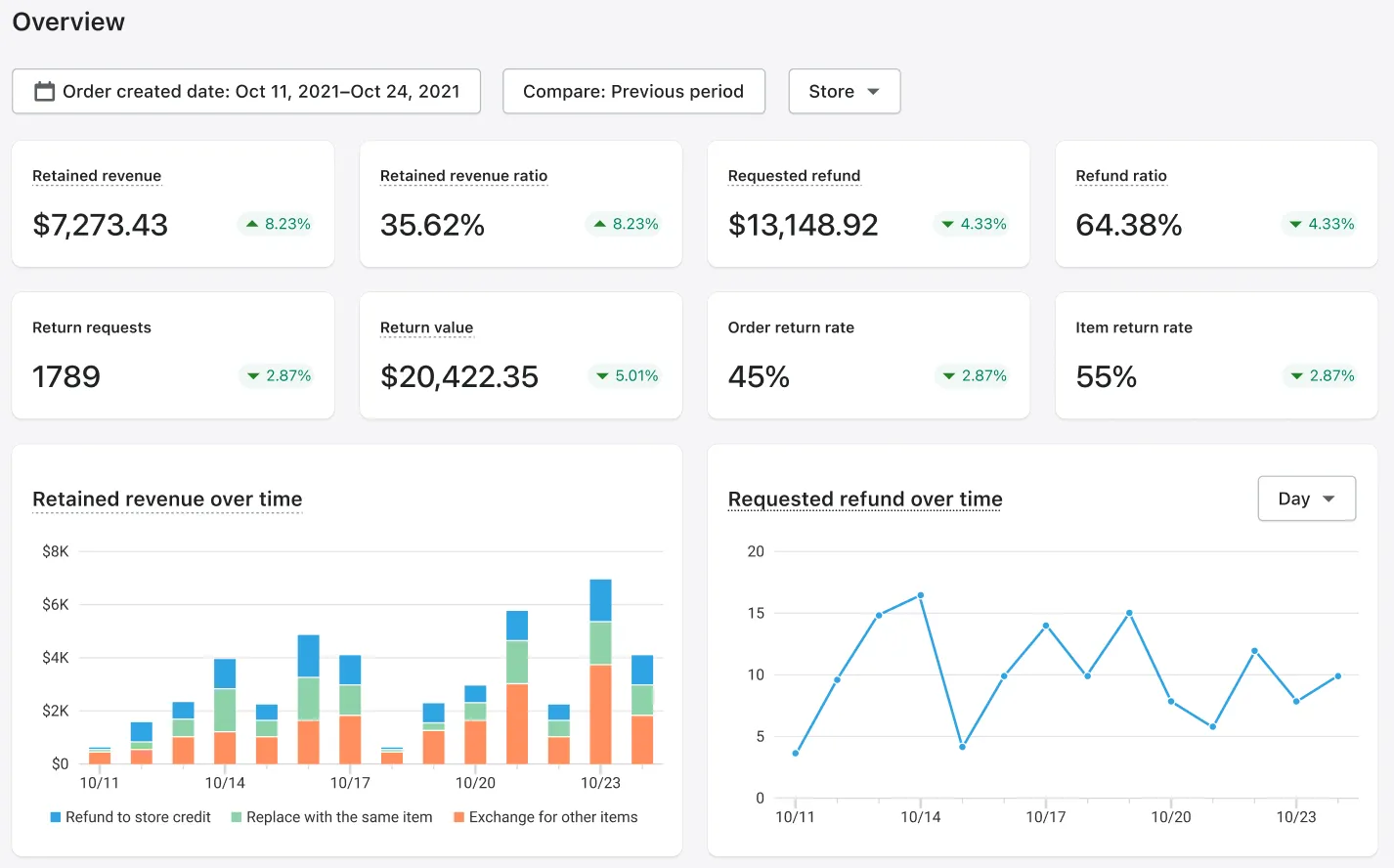
The payoff is measurable. Pelagic Gear saw an 18% lift in purchases driven by its returns portal and a 12% drop in return-related contact tickets, the kind of figures that move the revenue line and the support line at the same time, as detailed in Pelagic Gear's success story. That's the shift this section is really about: returns stop draining margin and start working as a retention channel. It's also the capability that most clearly separates a post-purchase platform from a tool that ends at the label.
The Full Picture: How AfterShip and Brightpearl Work in Tandem
Here's the part most comparison articles skip, and the one your team will actually grill you on: how does any of this connect to Brightpearl? Be straight about it. AfterShip is not listed in Brightpearl's connector directory. Neither is Shippo. Both connect through Brightpearl's REST API and webhooks, through an iPaaS partner such as Patchworks (which ships a prebuilt Brightpearl connector), or through AfterShip's onboarding team for mid-market and Enterprise accounts.
That makes the integration custom but supported. It is not native, seamless, one-click, or plug-and-play, and anyone who tells you otherwise is selling. What you get instead is a defined, repeatable path. Here is the data flow end to end:
- An order is placed and lands in Brightpearl, your system of record.
- Order data flows to AfterShip through the REST API or an iPaaS connector.
- AfterShip Shipping applies your routing rules and generates the label.
- The tracking number is written back into Brightpearl via API or webhook. This is an achievable build, a standard pattern, not a default toggle.
- AfterShip Tracking fires proactive notifications to the customer.
- The customer initiates a return through the AfterShip Returns portal.
- RMA and return data syncs back into Brightpearl for inventory and financial updates, via the Returns API and webhooks, which require Returns Premium. This is also a build, not automatic out of the box.
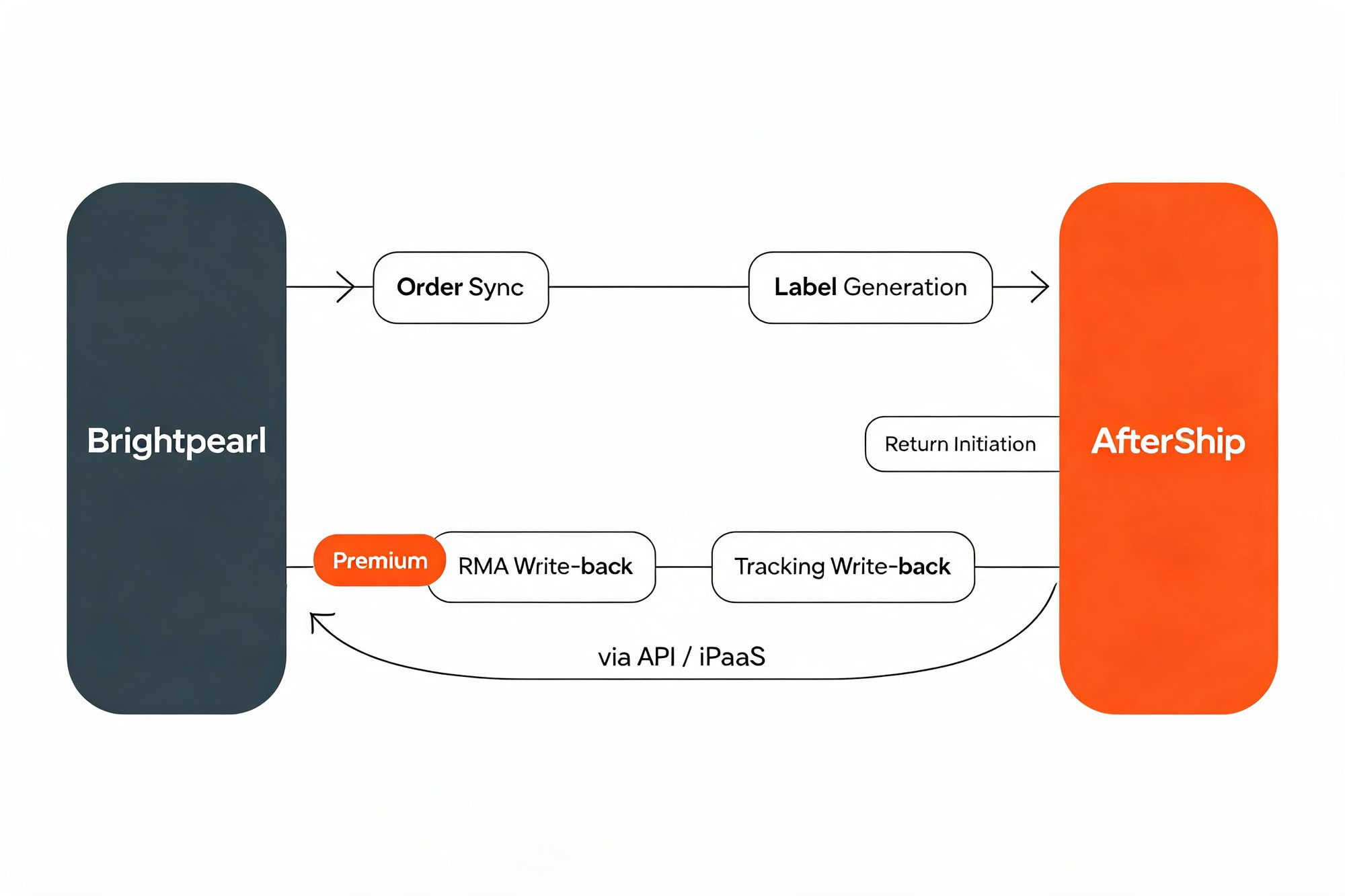
The honesty is the selling point. A vendor that's clear about what's configured versus what's automatic is the one you can trust to scope the project with you, and the same API-and-webhook pattern is how AfterShip integrates with 3PLs like ShipBob.
Is AfterShip Always the Right Choice?
No, and pretending otherwise would cost you trust. Here's the honest boundary.
If you ship fewer than ~500 domestic packages a month on a single carrier contract and don't need post-purchase branding or returns automation, Shippo's simplicity is the cost-effective choice, and its Pro plan now even includes branded tracking and AI delivery estimates. AfterShip is built for the complexity and opportunity that arrive with scale: when optimizing carrier costs, deflecting WISMO tickets, and running returns as a loyalty channel have a direct line to your bottom line.
Frequently Asked Questions
What is the best Shippo alternative for Brightpearl users?
For a mid-market Brightpearl operator shipping 1,000+ orders/month, AfterShip is the strongest Shippo alternative. It extends beyond label printing into rules-based carrier automation, branded tracking with proactive SMS and email notifications, a self-service returns portal with automation and analytics, and AI delivery estimates. Shippo remains a strong, simpler fit below roughly 500 domestic packages/month on a single carrier.
Does AfterShip integrate with Brightpearl?
AfterShip is not a turnkey listing in Brightpearl's connector directory, and neither is Shippo. Both connect through Brightpearl's REST API plus webhooks, through an iPaaS partner such as Patchworks (which ships a prebuilt Brightpearl connector), or through AfterShip onboarding/professional services for mid-market and Enterprise accounts. It is a custom but supported integration, not a one-click install. Tracking numbers can be written back into Brightpearl via the Shipping API, and RMA/return data can be synced back via the Returns API and webhooks on the Returns Premium tier.
How does AfterShip compare to Shippo for multi-carrier shipping?
Both compare carrier rates. The difference is automation: AfterShip Shipping adds a conditional rules engine that auto-selects a carrier and service based on SKU, destination, weight, order value, and more, up to 10 rules on Essentials and Pro, expanded on Enterprise. Shippo focuses on discounted labels and rate comparison without an equivalent conditional carrier-routing engine.
Can AfterShip manage returns?
Yes. AfterShip Returns provides a branded self-service returns portal, automation rules, store-credit and exchange incentives, rules-based fraud prevention, and analytics. The branded portal and store-credit refunds start on the Essentials tier; advanced approval workflows, AI-powered exchanges, advanced analytics, and the Returns API/webhooks needed to sync RMAs back to an ERP like Brightpearl require the Premium tier. Shippo sells return labels but does not offer a self-service returns portal.
The Strategic Upgrade for Your Brightpearl-Powered Business
You didn't migrate to Brightpearl to keep running a fragmented last mile. You did it to run a tighter, more profitable operation, and your post-purchase stack should hold that same standard. AfterShip is not just a Shippo alternative; it's a post-purchase operating system that turns shipping, tracking, and returns into one connected layer of data on top of the ERP you already trust, so your Brightpearl investment finally pays out across the whole customer journey.
See how AfterShip stacks up among the leading ParcelLab alternatives.
Simplify shipping and order fulfillment across Shopify, TikTok Shop, and your carrier network.
Book a demo