
Tired of WISMO? A CX Manager's Analytics Tool Verdict


Your support team is on track to spend another 40 hours this week answering the same question: "Where is my order?". You've seen the dashboards that show you there's a problem, but what if there was a tool that actually helped you fix it, before the customer even knows to complain?
The Real Cost of WISMO Isn't Just Ticket Volume
The real damage from a "where is my order?" ticket isn't the agent time it burns, it's the customer you quietly lose while burning it.
Yes, the volume is brutal. WISMO is the single most common question in eCommerce, accounting for 18% of incoming support requests, and at roughly $12 to resolve a human-handled ticket, a desk fielding 300 of them a day is spending real money to tell people what a carrier scan already knows. But that line item is the smallest part of the bill.
The bigger costs hide where a support report never looks. Every anxious "where is it?" comes from a customer who was already worried, and a slow or templated reply confirms the worry instead of resolving it. CSAT slips, a would-be 5-star reorder turns into a 2-star review, and a shopper who would have come back simply doesn't. That erosion compounds: softer CSAT and thinner repeat-purchase rates quietly drag down lifetime value, the number your CFO actually watches. It lands on your team, too. Agents who spend the day pasting tracking links instead of solving real problems burn out, and turnover on a support desk is its own expensive, invisible tax.
So treat WISMO as what it is: not a queue to staff around, but a strategic problem touching CSAT, retention, and team morale at once. Frame it that way and the question shifts from "how do we answer faster?" to "how do we stop the question from being asked?"

Why Your Current "Analytics" Aren't Helping
If your analytics can tell you a problem happened but can't help you stop the next one, you've got a report card, not a tool.
Most shipping dashboards were built to measure operations, not to protect the customer relationship, and that mismatch is why you can study one all week and still field the same 300 tickets a day. They tend to let a CX leader down in four specific ways:
- They're reactive. The numbers describe last week's deliveries, so you learn about a bad carrier lane only after the angry tickets have already landed.
- They're lagging, not leading. An on-time-delivery score of 92% is a verdict on the past, not a warning about the shipments stuck right now.
- They're built for Ops, not CX. They optimize for delivery percentages and SLAs, not the ticket volume, contact rate, and customer sentiment you're actually measured on.
- They don't connect to anything. Knowing 200 parcels are delayed changes nothing by itself; there's no path from the insight to a message that reaches the customer first.
In short, they tell you what happened. They never tell you what to do next, and they never do it for you.
The 3 Things a WISMO-Killing Tool MUST Do
Before you shortlist a single vendor, hold every one of them to three non-negotiable jobs, because proactive notifications alone can cut WISMO tickets by over 50%, but only when a tool does all three. The upside isn't only deflection: as a respected CX publication reports, proactive communication also lifts CSAT and strengthens customer loyalty, the outcomes you're ultimately measured on.
- Identify problems proactively. The tool has to flag a shipment in trouble, whether it's stalled in transit, stuck at customs, or sitting on a failed delivery attempt, before the customer notices and writes in. If you're hearing about exceptions from your own inbox, you've already missed the moment that matters.
- Automate proactive communication. Spotting the problem isn't enough; the tool has to act on it. The instant a shipment goes sideways, an on-brand message should reach the customer on its own, turning a future complaint into a reassurance they never had to ask for. Insight that doesn't trigger an action is just a better-looking report.
- Measure carrier performance by CX impact. Finally, it has to show you which carriers are actually costing you, not in abstract transit averages, but in the anxious customers their slow or unreliable lanes push into your queue. That's the line between a vanity metric and a number you can take into a contract renewal.
Hold that bar up and most "analytics" tools drop away on the spot. Next, we measure one against all three.
The Verdict: How AfterShip Tracking analytics Delivers on the "Must Haves"
Measured against those three jobs, AfterShip Tracking analytics is the rare tool that doesn't just score the problem, it works it.
Here is how it clears each bar.
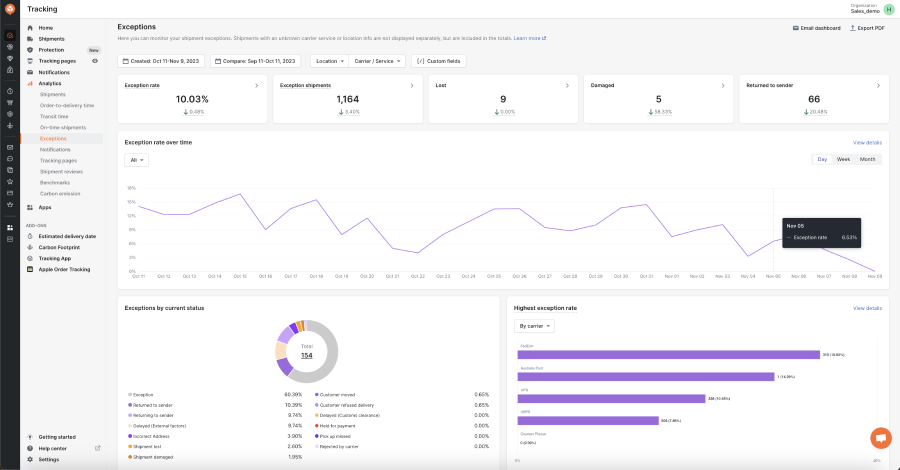
1. It identifies problems proactively. This is where the payoff is clearest: AfterShip Tracking analytics detects delivery exceptions before customers complain, surfacing every stalled, failed-attempt, or stuck-at-customs shipment on a dedicated Exceptions Dashboard so your team can act on the parcel while the customer is still calm. The proof is Moda Operandi. Working from that same named Exceptions Dashboard, the luxury retailer cut shipment exceptions by 25% and WISMO inquiries by 65%. As Bushra Sarfaraz, Fulfillment Director at Moda Operandi, put it: "Using AfterShip opened our eyes to the issues we were dealing with. The more we dig into the data and analytics, the more we were able to highlight additional pain points." The chain is simple: a named dashboard exposes the exceptions, the exceptions fall, and the tickets fall with them.
2. It automates the communication. Spotting a stuck parcel only matters if someone reaches the customer first, and this is the link most tools miss. On AfterShip Tracking's Premium plan, you connect Klaviyo or Attentive and trigger an on-brand email or SMS automatically the moment a shipment stalls or hits a delivery exception, for example a parcel held in customs, so the reassurance lands before the customer opens a ticket. The trigger is a rule you configure, not a fixed preset: if you'd rather wait until a parcel has been stalled for 48 hours before reaching out, you set the rule to fire at 48 hours. The point is that the insight acts on its own, instead of waiting for an agent to notice.
3. It measures carrier performance by CX impact. Finally, AfterShip Tracking provides analytics to measure carrier performance by CX impact. The Carrier transit time analytics view shows transit-time distribution, average transit, and the P85 (the time 85% of a carrier's parcels beat), so you can see which carrier's slow tail is quietly generating your most anxious customers. To be precise about what it is and isn't: there is no literal "tickets attributed to Carrier X" column. What you get is the leading indicator. Slow lanes and exceptions are what drive WISMO contacts, so when you carry a carrier's P85 into a renewal and fix or replace its worst lane, the ticket volume follows.

Three jobs, one workflow. That is the difference between a dashboard you read and a system that lowers your contact rate.
AfterShip Tracking analytics vs. The Field: A CX Manager's Scorecard
Against the tools a CX leader actually shortlists, AfterShip wins not by out-featuring anyone but by linking analytics to action at mid-market speed and price.
The honest truth is that the serious players are closer than any vendor admits, so the scorecard below grades them on what a CX leader is measured on, not a generic feature list. AfterShip sits among these names across the broader package tracking software category.
| Criteria | AfterShip Tracking | Narvar (Track + IRIS) | Wonderment / Loop Order Tracking |
|---|---|---|---|
| Proactive exception alerting | Exceptions Dashboard surfaces stalled / failed / customs holds | Yes, enterprise-grade via Track + Notify | Yes (delay alerts), Shopify-centric |
| CX automation workflows | Triggers Klaviyo / Attentive email and SMS on exceptions (Premium) | Notify + agentic AI; enterprise setup | Proactive alerts; tied to Loop's returns platform |
| Carrier performance ROI | Carrier transit time analytics (P85, avg transit) across 1,300+ carriers | IRIS analytics (74B+ interactions annually); ops-oriented | Limited multi-carrier analytics depth |
| Helpdesk integration depth | Native Zendesk app + Gorgias technology-partner integration | Enterprise integrations; Zendesk partnership | Shopify-native; helpdesk via Loop ecosystem |
| Time to value | Self-serve, same-day data; first alert live in an afternoon | Slower, implementation-led | Fast for Shopify-only simplicity |
Read it and the pattern is clear. Narvar is a genuinely powerful enterprise platform: its Track product plus the IRIS analytics engine, trained on more than 74 billion consumer interactions a year, brings real analytical depth. But it is built for enterprise scale and sold that way, which means slower, implementation-led onboarding and a price tag to match, a poor fit for a mid-market CX team that needs a defensible number this quarter. Wonderment, now Loop Order Tracking, is the opposite trade: clean and Shopify-native, but lighter on the multi-carrier analytics and exception-to-message automation a scaling brand leans on, with Loop's pricing starting at $155 to $272 a month that lands above AfterShip Tracking's Premium tier, the tier that unlocks the full analytics suite plus the Klaviyo and Attentive automation.
And to be fair about where AfterShip is not the obvious pick: for a very small, Shopify-only brand that just wants a prettier tracking page and isn't running deep analytics, Wonderment / Loop Order Tracking can be a faster, simpler setup. But that simplicity is exactly what a scaling brand with a dedicated CX team outgrows. The moment your carrier mix widens and your ticket volume becomes a budget line you have to defend, you need the action-linked, multi-carrier intelligence that turns analytics into fewer tickets, and that is the ground AfterShip is built to win. If you're weighing the two directly, you can compare directly against alternatives like Wonderment in more detail.
See It in Action: How Mous Cut Down on Customer Complaints
If you want to see what this workflow does to a real support queue, look at how leading brands like Mous did it: Mous cut its contact rate from 12.9% to 5.9%, more than halving the WISMO load on its team.
The accessories brand didn't get there with a nicer dashboard; it got there by doing the three jobs above in order. Proactive exception alerts and automated delivery updates intercepted the "where is it?" moment before it became a ticket, and carrier analysis fixed the worst lane at the source: Mous cut its Canada lead times by 82%, from two weeks to 2.5 days, removing the delays that were generating the complaints in the first place. Fewer anxious customers, fewer tickets, a contact rate cut by more than half.
“AfterShip allowed us to set up KPI dashboards to see how well everything is going and troubleshoot before it becomes a problem.”
Rosie Jennings, Head of Logistics
Read their story →That is the model in miniature: see the problem early, message the customer first, and starve your worst carriers of the delays that fill your queue.
Building Your Business Case: Calculating the ROI of Proactive CX
The business case for proactive CX isn't a leap of faith, it's arithmetic that clears a sub-$100-a-month tool many times over.
Start with your reactive cost. The formula is simple: average WISMO tickets per month multiplied by the cost to resolve one by hand. It's worth remembering why that volume runs so high in the first place. WISMO is the single most common eCommerce support request, at 18% of all incoming tickets, according to Gorgias. Take a support desk handling 3,000 WISMO tickets a month at roughly $12 per human-handled ticket, and you're carrying about $36,000 a month, or $432,000 a year, just to answer "where is my order?". Scale that to your own ticket volume; if your team's monthly number is higher, the savings below only grow.
Now apply a deflection rate, and keep it conservative. A 50% reduction is the floor here, not the ceiling: Mous cut its contact rate by over 50%, and named brands have gone further, with Moda Operandi at 65%, StackCommerce at 71%, and Inspire Uplift at 75% fewer WISMO tickets. Even at the floor, that desk deflects 1,500 tickets a month, saving $18,000 a month, or $216,000 a year.
Set that against the tool. On AfterShip's direct-site pricing, Premium, the tier that unlocks the full analytics suite plus the Klaviyo and Attentive automation, starts at $59 a month. That's an $18,000 monthly saving against a $59 monthly cost, roughly a 305x monthly return on that channel. Pricing differs by channel, so compare against one and stick to it (the Shopify App Store packages Premium differently). Against a five-figure monthly WISMO bill, a sub-$100 tool is the easiest line item you'll defend all quarter. To equip your team with the tactics behind that deflection, these actionable tips to reduce WISMO tickets are a practical starting point.
The Final Take for CX Leaders
Here is the whole verdict in one line: every other tool on your shortlist hands you data, and AfterShip Tracking analytics hands you the workflow that turns that data into fewer tickets.
You've seen the mechanism and the math. The tools that only report leave the hardest part, reaching the customer before they complain, on your team's plate. AfterShip closes that loop: it flags the exception, fires the on-brand message, and shows you which carrier to fix next, the same chain that took Moda Operandi to 65% fewer WISMO inquiries and Mous past a 50% cut in contact rate. For a mid-market CX leader who has to defend a budget and move CSAT this quarter, that is a tool built for your job, not the ops team's. The honest catch is that it asks for a little configuration up front rather than a single toggle, but that is a matter of an afternoon, not a six-month rollout, and you can have your first proactive alert running today. If you're ready to put a number in front of your VP, the fastest next step is to see it work against your own data. Treating tracking, notifications, and returns as a unified customer experience is what keeps those WISMO gains compounding instead of fading.
Proactive shipment tracking that delights your customers, reduces WISMO tickets, and optimizes your delivery performance.
Book a demoYour WISMO Reduction Questions, Answered
These are the questions a CX leader asks before signing, and the short version is that the tooling fits your stack, sets up in an afternoon, and scales across 1,300+ carriers.
Frequently Asked Questions
How does this integrate with Gorgias and Zendesk?
The deepest integration is the native AfterShip Tracking app in the Zendesk Marketplace, which surfaces live shipment status and delivery exceptions inside the agent's ticket view, so an agent answering 'where is my order?' never leaves Zendesk. Gorgias is supported through a technology-partner integration that syncs real-time tracking data. For any other helpdesk, AfterShip's API and webhooks (Premium plan) feed delivery-status and exception events into your team's own workflows.
How long does it take to set up these proactive alerts?
Fast, and self-serve. Your dashboards (Exceptions, Carrier transit time, Shipping review) start populating the same day orders flow, with no implementation project to schedule. To go live with a proactive alert, you connect Klaviyo or Attentive on the Premium plan, pick the trigger (stalled or exception), and attach your on-brand template, a configuration measured in hours. The first alert can be live in an afternoon, well inside a two-week evaluation window. There is no guaranteed-results clock; the speed is in the setup, and WISMO reductions follow as the workflow runs.
Can it handle multi-warehouse and multi-carrier complexity?
Yes. AfterShip tracks across 1,300+ carriers, so a widening carrier mix doesn't create blind spots, and multi-store support with consolidated analytics keeps a distributed operation under a single view instead of forcing your team to context-switch between accounts.