
AfterShip Shipping vs ShipRush: Which Is Best for Automating Labels in 2026?

Your packing station is a well-oiled machine... until it comes to printing the label. Toggling between carrier sites, manually entering addresses, and praying the desktop software does not crash is costing you hours every day. You know you need to automate, and you have narrowed it down to ShipRush and AfterShip Shipping. The question is not just which one prints labels faster, it is which one will stop shipping from being a bottleneck as you grow.
That bottleneck carries a real cost. Industry estimates put the average cost to fulfill a single order at close to 70% of its value, which is why operations leads hear the same brief from leadership every quarter: ship faster, spend less.
So here is the practical version of the AfterShip Shipping vs ShipRush decision. Not a feature checklist, but a clear answer for a team shipping 500 to 5,000 orders a month and tired of losing hours at the label step. Which tool actually clears the bottleneck today, and which one sets you up for what happens after the label is printed? Start with the verdict, then judge it against the details.
AfterShip vs ShipRush: The 1-Minute Verdict
Short on time? Here is the answer before the breakdown.
- Choose AfterShip Shipping if you are a growing, cloud-first eCommerce brand that wants label automation plus a connected post-purchase platform it can add on the same account (branded tracking, proactive notifications, and self-service returns), all under one login.
- Choose ShipRush if you handle label-only or freight-heavy shipping and want flat, predictable, unlimited-volume printing, a legacy-ERP fit, or LTL freight, and do not need a branded customer experience.
Be clear-eyed about price. For pure, low-volume label printing with no branded-experience needs, ShipRush Express at $9.95/mo (three users, unlimited volume) is the cheaper and simpler choice, and we will not pretend otherwise.
The case for AfterShip Shipping is a different one. It is not that it prints labels for less. It is that the same label can feed your tracking page, your notifications, and your returns later, with no order re-keyed into a second system. That makes this a decision about where your operation is headed, not only what it costs this month.
Head-to-Head: The Core Shipping Automation Features
Here is how the two compare on the six criteria that matter most to a team running its own fulfillment, using current, verified values for each vendor rather than marketing claims.
| Criteria | AfterShip Shipping | ShipRush |
|---|---|---|
| Core Technology (Cloud-Native vs. Hybrid) | Cloud-native, browser-based printing, no local agent. | Hybrid: web UI plus required local Desktop Toolbox on the printing machine to print to physical/thermal printers. |
| Label Automation Rules | Rule engine, up to 10 rules on non-Enterprise (each rule bundles multiple actions; AND/OR conditions; ranked priority; custom-field conditions Enterprise-only). | Rule/preset-based label automation, no published 10-rule cap. |
| Multi-Carrier Rate Shopping and Discount | Best USPS discount on pre-negotiated USPS rates (no carrier contract), plus bring-your-own carrier accounts on all tiers; 130+ carriers. | Per-service-class USPS discounts (up to 89% Priority Mail Cubic, 52% Ground Advantage, 46% Priority); reported $0.20/label Ground Advantage surcharge (Veeqo, 2024) vs ShipRush's own 'no label fees' claim. |
| eCommerce Integration (Shopify focus) | Native Shopify app, automatic order import, writes tracking number/carrier/tracking URL back to the order, can auto-fulfill on label creation. | Shopify and broad integrations, with a legacy-ERP and supply-chain lean (Descartes). |
| Integrated Platform Value (Tracking and Returns) | Same login and shared data model; the label's tracking number feeds AfterShip Tracking (branded page + notifications) and AfterShip Returns once those SEPARATE subscriptions are added; 25% first-year bundle discount for 2+ products; shared seats $10/seat/mo annual. | None (label/freight point solution, no tracking page, notifications, or returns layer). |
| Scalability and Ease of Use | No-install cloud onboarding, realistic same-day first label, per-seat team model ($10/member/mo annual, $12 monthly), no hard spend cap (alerts on overage). | 3 users included per plan, additional users in 3-user bundles, flat unlimited-volume pricing. |
The pattern underneath the table is the real story. ShipRush is a focused label-and-freight tool, while AfterShip Shipping is a parcel platform built to connect the label to everything that happens after it. The next sections put that claim to the test where it counts: automation and printing speed, carrier rates, and the data the label unlocks downstream.
Who Wins on Label Automation and Printing Speed?
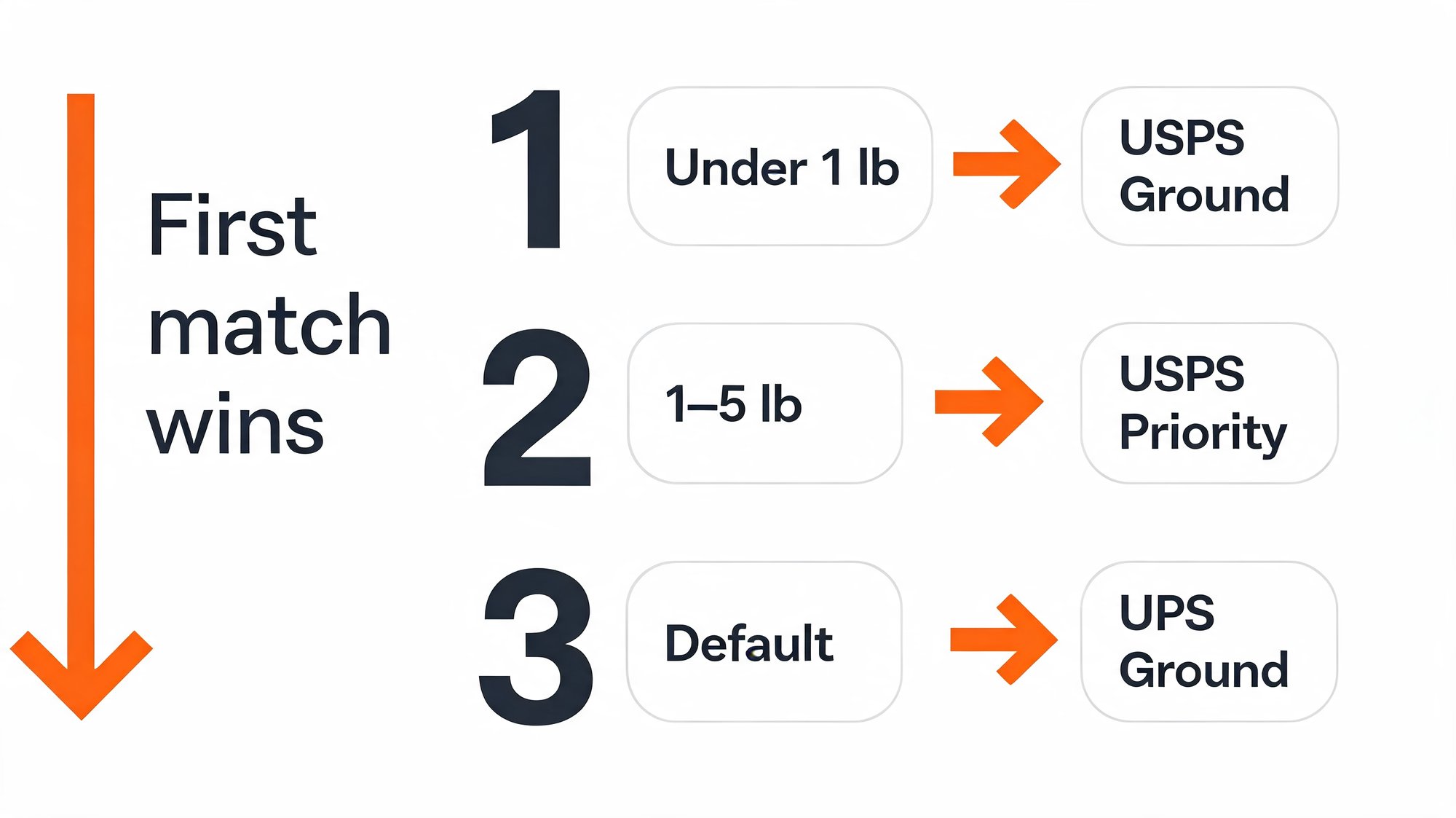
Automation is where a shipping tool either earns its keep or becomes another tab to babysit. In the AfterShip Shipping vs ShipRush matchup, this is the first place they diverge. AfterShip Shipping runs on conditional rules you set once. A typical rule reads like plain logic: if package weight is under 1 lb and the destination is domestic, use USPS Ground Advantage. The system applies that choice automatically at label time, so nobody on your team is hand-picking a carrier 300 times a day.
There is one constraint worth stating plainly: on non-Enterprise plans, AfterShip Shipping allows up to 10 automation rules, per the current help center. That sounds tight until you see how much each rule carries.
Each rule bundles several actions at once: carrier, service level, package type and size, weight, and ship-from location. Conditions combine with AND/OR logic, and rules run in a ranked priority order, so the first match wins. That structure is why a busy multi-carrier operation shipping 500 to 5,000 orders a month fits comfortably inside 10. Here is a realistic 10-rule setup that covers the vast majority of parcels:
- Domestic under 1 lb goes to USPS Ground Advantage
- Domestic 1 to 5 lb goes to USPS Priority
- Domestic over 5 lb goes to UPS Ground
- Expedited service requested goes to UPS 2-Day
- International goes to your international carrier and service
- High-value SKUs go to a carrier with signature
- A specific store or channel goes to that channel's carrier
- Heavy or oversize (by weight) goes to a freight-zone carrier
- Free-shipping orders go to the cheapest qualifying service
- A catch-all default sets the fallback carrier and ship-from
One caveat for complex setups: custom-field conditions are Enterprise-only. For most growing brands, the standard conditions above are plenty.
Then there is the question of where printing actually happens. AfterShip Shipping is cloud-native and runs in the browser, so any team member can print from any machine with nothing to install. AfterShip also has a deep integration with Shopify that imports orders automatically, which is what feeds those rules in the first place.
ShipRush works differently, and it is worth being precise here. ShipRush is a hybrid tool: the web interface runs in a browser, but the machine that physically prints, including any thermal printer, still needs the local ShipRush Desktop Toolbox agent installed and kept updated. That is not a knock on capability, and it is not limited to one user; ShipRush plans include three users by default. It does mean a remote or multi-station team carries a local dependency that a fully cloud printer does not.
For a team that prints from one fixed station, the Desktop Toolbox is a non-issue. For a growing team that wants anyone to print from anywhere, cloud-native is the cleaner answer.
Which Offers Better Carrier Rates and Integrations?
Rates are where the spreadsheet math gets persuasive, so let's keep it honest.
AfterShip Shipping gives you two ways to save. Out of the box, you get access to pre-negotiated USPS rates with no carrier contract required, what its plans list as the "Best USPS discount." On top of that, every tier lets you connect your own carrier accounts and apply your negotiated rates, and the platform spans 130+ carriers for label generation.
ShipRush's discount story needs one clarification most comparisons skip. Its headline up-to-89% figure applies only to Priority Mail Cubic, a niche class with strict size rules. On the workhorse classes most SMBs actually ship, the discount is lower: up to 52% on Ground Advantage and up to 46% on Priority. So a headline-percentage comparison is the wrong comparison; the right one is on the services you run every day.
The cost detail to verify is on fees, not headline percentages. ShipRush's own USPS page states "no label fees," yet a 2024 Veeqo report cites a $0.20 per-label surcharge on Ground Advantage through ShipRush. Across 6,000 to 60,000 labels a year, twenty cents a label adds up fast, so it is worth confirming directly before you commit.
On integrations, both tools connect to Shopify and the major platforms. ShipRush leans toward broad and legacy-ERP integrations, fitting its supply-chain parent, Descartes. AfterShip sits among the modern shipping API alternatives that many teams shortlist together.
The payoff of getting this setup right is time. AfterShip customers report saving 5 to 6-plus hours per week on manual post-purchase work, an outcome driven by the connected platform (its Tracking and Returns products), not by label speed alone. That is the kind of proof that survives a skeptical operations review.
A concrete example: Internet Up, a multi-brand DTC operator, runs AfterShip Tracking and Returns (not Shipping) and recaptured more than six operational hours a week by unifying its post-purchase stack on one platform.
“Both tools have greatly improved the transparency and efficiency of our delivery and return processes.”
Gerald Bancilhon, Head of Customer Experience & Operations
Read their story →Neither tool is strictly cheaper on every line. The honest read: ShipRush competes hard on flat printing economics, while AfterShip Shipping competes on realistic everyday discounts plus the platform those rates feed into.
The Deciding Factor: What Happens After the Label is Printed?
Here is the question that should settle this for a growing brand: what happens the moment after the label prints?
With ShipRush, that is the end of the job. The label is generated, the package ships, and the tool's work is done. There is no tracking page, no proactive notification, and no returns layer for that shipment to flow into. Nothing is wrong with that if a printed label is all you need.
With AfterShip Shipping, the label is a starting point. Generating it creates a tracking number, and the Shopify integration writes that number, the carrier name, and the tracking URL back to the order, and can auto-fulfill it. With a true multi-carrier shipping software, that shared tracking number becomes the key that lets the rest of the platform light up.
Be precise about what "light up" means, because this is where comparisons oversell. The branded tracking page and proactive delivery notifications are AfterShip Tracking. The self-service returns portal is AfterShip Returns. Each one is a separate subscription on the same platform. Buying AfterShip Shipping on its own does not hand you a branded tracking page or notifications.
So "one platform" is not "one bill." It means one login, one dashboard, one customer record, and one shared data model. The label you already printed feeds Tracking and Returns with no order re-keyed into a second system. That connected data flow, not a single magic checkbox, is the real advantage.
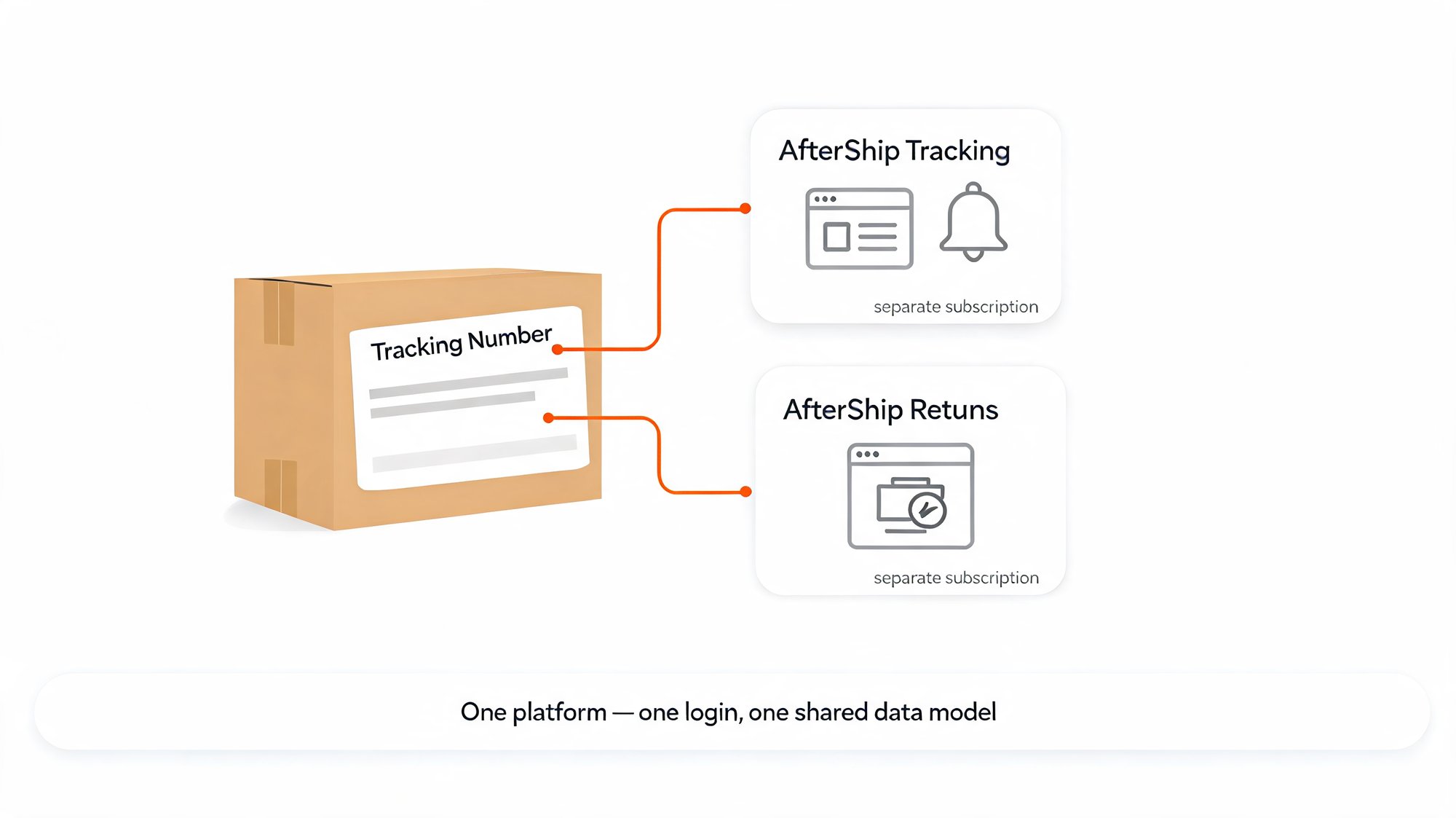
The same shared data powers the returns side. Once AfterShip Returns is subscribed, that customer and order record drive a self-service returns portal, which cuts WISMO ("where is my order") tickets and return-related support load.
The economics reward composing the platform over time. You add any product to the same account, with 25% off the first year when you run two or more products, and shared team seats at $10 per seat per month (annual) that carry across every product. There is no hard spend cap; AfterShip alerts you on quota overage instead of blocking your shipping. A label-only point solution like ShipRush has nothing equivalent to connect to.
AfterShip vs ShipRush: A Breakdown of Pricing and Value
Pricing matters, so let's frame it by need and ROI rather than sticker price.
AfterShip Shipping uses a volume-based ladder. Here is how AfterShip Shipping's pricing plans break down:
- Free: 10 free labels, 90 carriers, and a 7-day trial.
- Essentials: a volume slider from $9/mo at 1,200 labels a year up to $79/mo at 60,000 labels a year (annual billing, about 18% off monthly).
- Pro: $69 to $479/mo at 24,000 to 300,000 labels a year, adding developer tooling such as APIs, address validation, and webhooks.
- Enterprise: custom pricing, with unlimited carrier accounts and SSO.
Team seats run $10 per member per month on annual billing, or $12 monthly.
Here is the number that matters for this persona. A brand shipping 500 to 5,000 orders a month prints roughly 6,000 to 60,000 labels a year, which lands squarely inside Essentials at about $29 to $79/mo. You do not jump to Pro because your volume grew. You move up only if you need the developer tooling, not because you shipped more boxes.
ShipRush stays flat by design: Express at $9.95/mo (unlimited volume), Speedy at $29.95/mo, and Warehouse at $99.95/mo.
So the honest crossover is simple. For pure label printing, ShipRush is cheaper. AfterShip Shipping costs more because of what it connects to, not because you crossed a volume line: branded tracking, notifications, and returns, one vendor and one customer record, and cloud-native printing any team member can run.
The Verdict: Why Modern SMBs Choose AfterShip Shipping
For a growth-focused DTC or B2C parcel brand, AfterShip Shipping is the stronger choice. It automates labels today and gives you a connected post-purchase experience to grow into, all from one login and one shared data model.
Warning: A standalone label tool creates data silos. The label is the end of its job, so your tracking page, notifications, and returns live in separate systems. That means more manual re-keying and a customer experience stitched together across tools that do not talk to each other.
Now the honest part, because a verdict without concessions is just marketing.
First, on price. If you only need label-only printing with no branded-experience plans, ShipRush Express at $9.95/mo (unlimited volume, three users) is cheaper and simpler than AfterShip's Essentials slider. We are not going to argue otherwise.
Second, on freight and legacy systems. AfterShip Shipping has no native LTL or freight tier, no bill of lading or pallet-label workflow, and no deep legacy-ERP focus. ShipRush, owned by supply-chain software company Descartes, offers native LTL rating and LTL shipping ($100 to $250/mo for 3 to 10 carriers), freight documentation on its Warehouse tier, and a stronger legacy-ERP fit.
So the real decision is about what you ship. If your operation is freight-heavy or tied to a legacy ERP, ShipRush is the better-fit tool. If you are a DTC or B2C brand shipping individual parcels, AfterShip Shipping is the stronger choice in the AfterShip Shipping vs ShipRush call, precisely because the same label feeds a branded tracking page, proactive notifications, and self-service returns on one connected platform.
Simplify shipping and order fulfillment across Shopify, TikTok Shop, and your carrier network.
Book a demoFrequently Asked Questions
Who wins on label automation and printing speed, AfterShip Shipping or ShipRush?
AfterShip Shipping is cloud-native and prints from any browser with nothing to install, using up to 10 conditional automation rules on non-Enterprise plans. ShipRush is hybrid: its web app sets up shipments, but the machine that physically prints needs the local Desktop Toolbox agent installed and kept updated.
Which has better carrier rates, AfterShip Shipping or ShipRush?
AfterShip Shipping lists a 'Best USPS discount' on pre-negotiated USPS rates with no carrier contract, plus bring-your-own carrier accounts across 130+ carriers. ShipRush's headline up to 89% applies only to Priority Mail Cubic; on everyday classes it is up to 52% on Ground Advantage and up to 46% on Priority.
Does ShipRush offer tracking and returns like AfterShip Shipping?
No. ShipRush's job ends at the printed label, with no tracking page, proactive notifications, or returns layer. AfterShip Shipping's tracking number feeds AfterShip Tracking and AfterShip Returns, which are separate subscriptions on the same platform with one login and one shared data model.
Is AfterShip Shipping or ShipRush cheaper?
For pure label printing, ShipRush is cheaper: Express is $9.95/mo with unlimited volume. A brand shipping 500 to 5,000 orders a month sits in AfterShip Shipping's Essentials tier at about $29 to $79/mo, priced for the connected platform rather than label volume alone.