
How to Compare Email Marketing Tools for Your Online Store

You're not buying a newsletter builder. You're investing in a communication engine for the whole customer journey.
That distinction gets lost the moment you open a comparison tab. Klaviyo, Mailchimp, a dozen others, each with a feature list longer than your last P&L. Meanwhile your support inbox keeps filling with the same three words: "where's my order?" Those WISMO tickets (industry shorthand for "where is my order") are the daily tax on a growing store, and no drag-and-drop editor makes them disappear.
So the real question isn't which tool has the prettiest templates. It's how to compare email marketing tools against the job they actually have to do: talk to your customer at every stage, from first click to delivered box. Get that framing right and the shortlist gets a lot shorter. Pick on templates alone, and you buy a tool that nails the easy first 20% of the journey and goes missing for the hard rest.

The 3 Kinds of Email Every Growing Store Needs
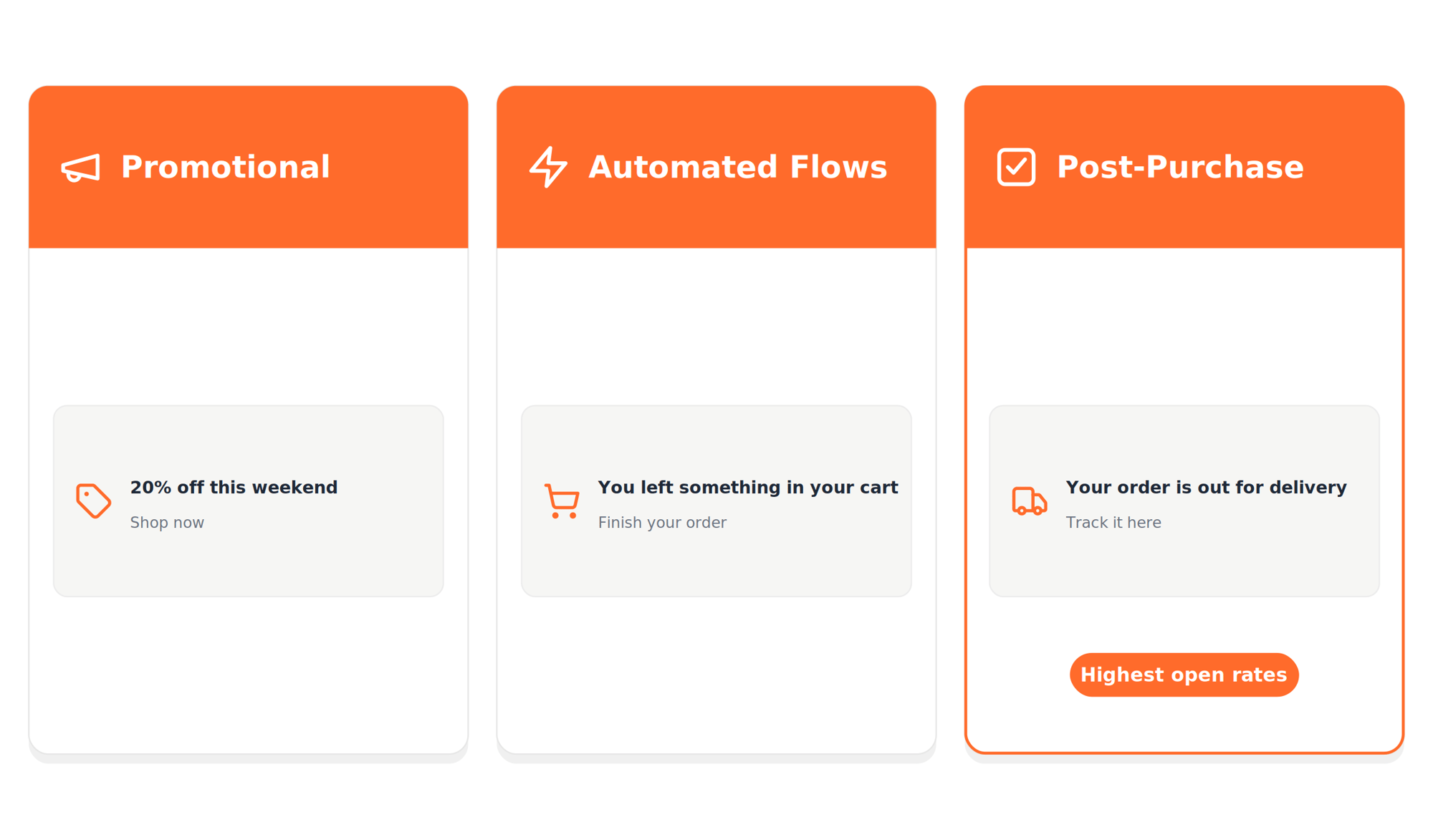
Strip away the marketing speak and every store really runs three kinds of email. Knowing which is which is the first step in evaluating email marketing services honestly.
Promotional email is the broadcast layer: launches, sales, seasonal campaigns. It drives short-term revenue, and it's what most tools are built to show off.
Automated flows are the always-on layer. Welcome series, abandoned-cart reminders, browse abandonment, back-in-stock alerts. They run on triggers and behavior, quietly compounding revenue while you sleep. This is where email marketing automation for ecommerce earns its keep.
Post-purchase and transactional email is the layer almost everyone underinvests in. Order confirmations, shipping updates, delivery alerts, review requests. It's the most overlooked of the three, and it carries the highest open rates of anything you'll send, because a customer who just paid you actually wants to hear from you.
Here's the catch most comparison guides miss. Most platforms were built around the marketing calendar, not the warehouse, so the post-purchase layer gets bolted on last, if at all. Plenty of tools handle one or two layers well and treat the third as an afterthought. AfterShip Email covers all three in one place, which matters far more than any single feature once you map it against the journey.
The Table Stakes: Core Features to Expect in 2026
Before you weigh anything that actually separates one tool from another, clear the bar that every credible option should already clear. These are the important features in an email marketing tool that became non-negotiable in 2026, not reasons to pick one platform over the next.
At minimum, expect:
- A visual editor that lets a non-designer build an on-brand email without touching code.
- Segmentation so you can target by purchase history, location, or behavior instead of blasting your whole list. Strong segmentation is where relevance, and deliverability, begin.
- A/B testing on subject lines, send times, and content, so decisions come from data instead of gut feel.
- Basic reporting on opens, clicks, and conversions, tied back to revenue.
A decade ago these were selling points. Today they're the cost of entry, available in nearly every tool on your shortlist. If a tool can't do these four, cross it off. But here's the trap: most buyers stop right here, score the table stakes, and crown a winner. That's exactly how you end up with a great newsletter tool that goes silent the moment a package ships.
Table stakes tell you which tools are serious. They don't tell you which one is right. Learning how to compare email marketing tools means judging the layer underneath: how a tool handles everything that happens after the buy button.
The Real Litmus Test: How Well Does It Handle Post-Purchase?
Every email tool can send a "your order shipped" message. The real question is what it knows after that.
Here's the structural limit most buyers never see. A standalone email tool plugged into Shopify can act on exactly one shipping signal: the "shipped" flag Shopify raises when you create a label. After that, the carrier takes over and your email tool goes dark. It can't tell when the package is out for delivery, when it actually arrives, or when it gets stuck in transit.
AfterShip closes that gap, but it takes two products working together, and it's worth being precise about which does what. AfterShip Email can trigger flows on four named delivery events: shipped, out for delivery, delivered, and delivery exception. Those real-time carrier statuses don't come from Email on its own. They come from AfterShip Tracking, the product that reads and standardizes delivery data into six statuses across 1,300+ carriers, then hands clean events to Email to act on.
That distinction matters for two reasons. First, it's honest: AfterShip Email and AfterShip Tracking are billed separately, so you're pairing two products, not flipping one switch. Second, it's the whole ballgame. A "delivery exception" email that reaches a customer before they even notice the problem is the difference between a saved sale and a support ticket.
And exceptions aren't edge cases. A failed delivery attempt, a bad address, a package held at a depot: these are the moments that generate your angriest tickets, precisely because the customer finds out before you do. Reading the carrier signal first is what lets you get ahead of the message instead of apologizing after it.
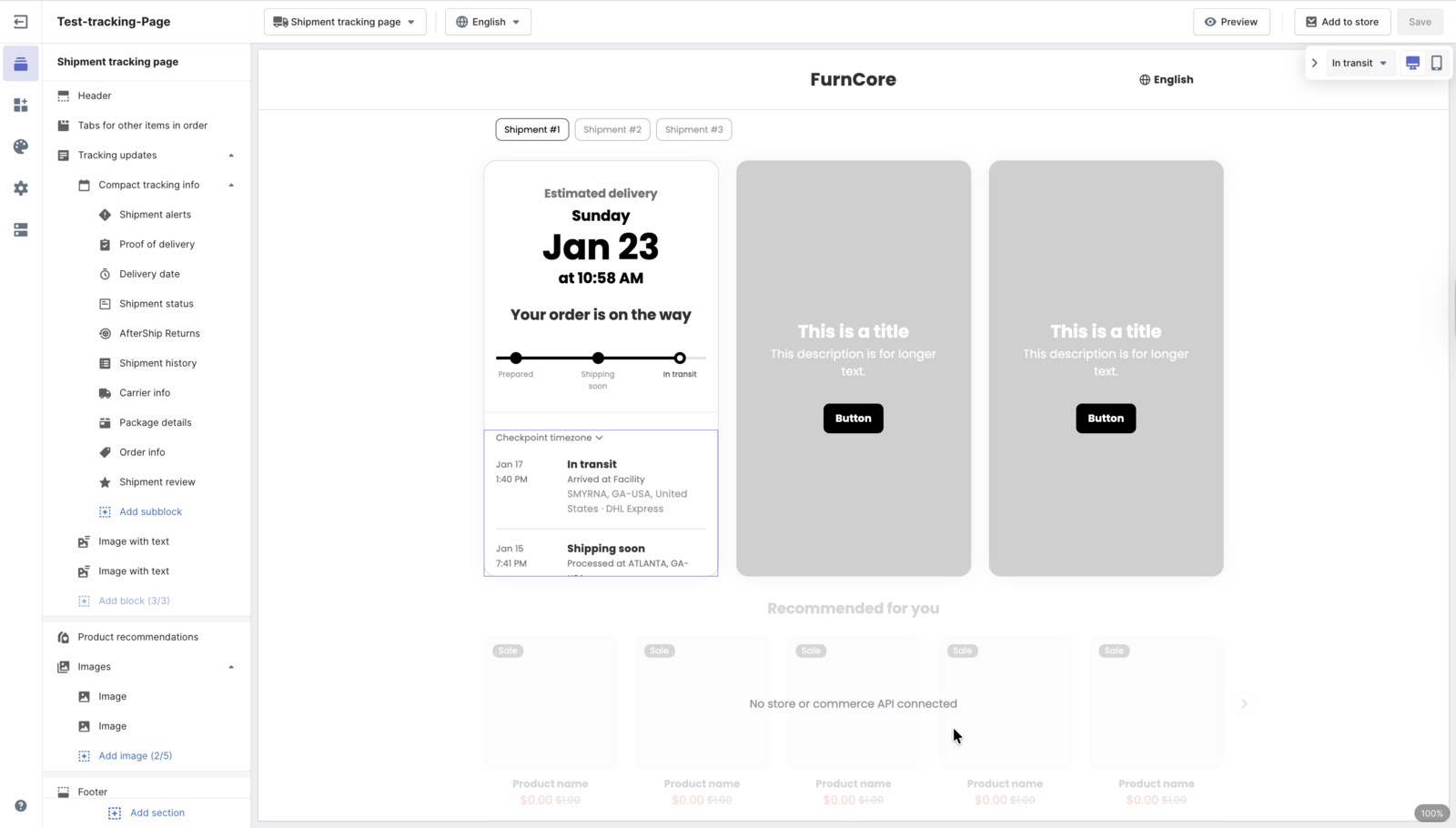
Picture the customer's side of this. Instead of refreshing a carrier site, they land on a branded tracking page that shows exactly where the package is, on your domain, in your colors. The page does the explaining so your inbox doesn't have to.
So when you test an email tool, don't ask whether it sends shipping emails. Ask what it can actually see. If the answer stops at "shipped," you've found the ceiling.
5 Key Criteria for Choosing Your Customer Communication Engine
Once post-purchase is on the table, the evaluation gets concrete. Score every tool on your shortlist against these five criteria, in this order. The order is deliberate: each criterion builds on the one before it, so a tool can ace the last and still fail the first.
- Integration Depth. A tool is only as smart as the data it can reach. AfterShip Email pulls order and behavioral data natively from Shopify, Shopify Plus, and WooCommerce: contacts, tags, segments, purchase events, and browse activity, not just an email list. Live delivery status is a separate feed that flows in from the Tracking layer, so the depth you care about spans both your commerce data and your shipping data. Thin integrations force you to export CSVs and stitch segments together by hand, which is where most teams quietly lose hours every week.
- Post-Purchase Automation. This is where the four named events earn their place. You want to build a flow like "package delivered, then request a review," or "delivery exception, then apologize and reassure," and have it fire on its own. AfterShip Email handles the four delivery events; the six standardized statuses behind them come from Tracking. If a tool advertises post-purchase automation but can only react to "shipped," it isn't automating the part that matters.

- Unified Brand Experience. Your customer shouldn't be able to tell where one tool ends and another begins. With AfterShip, branding is configured per product: a tracking page on your domain, a branded returns portal, and branded email templates. There's no single control panel that styles all three at once. The win is consistency across one ecosystem, every touchpoint looking like you, instead of a stitched-together patchwork. Customers don't grade each tool separately; they form one impression of your brand, and inconsistency is what chips away at it.
- Operational ROI. Tie the decision to support load, because that's the number a growing store actually feels. WISMO now runs 10 to 25% of all customer contacts, at roughly $4 to $12 each to resolve. Proactive delivery notifications attack that cost head-on. AfterShip merchants show the pattern plainly: Mous cut WISMO tickets 54%, Vivino cut them 50% while lifting repeat purchases 30% from the tracking page, and Aetrex reduced tickets 74% and return-processing time 86%.
“AfterShip allowed us to set up KPI dashboards to see how well everything is going and troubleshoot before it becomes a problem.”
Rosie Jennings, Head of Logistics
Read their story →- Scalable Pricing. Read the meter before you commit. AfterShip Email scales with your contact count, not your order volume, and there's no separate surcharge for transactional sends. Plans run from $9 to $99 to $149 and up to Custom, with segmentation and AI recommendations arriving at the Premium ($149) tier. Be clear-eyed about the tradeoff: if you're sending a hundred emails a month, AfterShip Email is not the cheapest option on the shelf, so weigh the journey value, not the entry price. The sharper question isn't what a plan costs at signup, but what a silent post-purchase experience costs you in tickets and lost repeat orders.
Run a tool through all five and the picture usually resolves fast. The standalone option wins on price at the very low end, and loses the moment post-purchase volume starts turning into tickets.
Framework in Action: Generic ESP vs. an Integrated Platform
Lay the two approaches side by side and the tradeoff stops being abstract. This isn't about brand names. It's about two categories of tool and what each one can structurally do.
| Criteria | Standalone Email Tool | Integrated Post-Purchase Platform |
|---|---|---|
| Branded Tracking Page | None; customers track on the carrier's site | Branded, on-domain tracking page with a live carrier timeline |
| Delivery-Status Triggers | Only the store platform's "shipped" event | Triggers on real carrier statuses (shipped, out for delivery, delivered, exception), standardized across 1,300+ carriers |
| Returns Portal Integration | Separate or none | Branded self-service returns in the same ecosystem |
| Unified data layer | Siloed contact list | Shared data layer across email, tracking, and returns |
| Single-ecosystem comms | Disconnected tools, inconsistent branding | Consistent branded communication across the whole journey |
Read down the rows and the pattern is hard to miss. A standalone email tool can send messages, but the branded tracking page, the live delivery-status triggers, the returns portal, and the shared data layer behind them all sit outside its reach. An integrated platform treats those as one connected surface, which is why the comparison tilts the way it does the moment post-purchase volume climbs.
The verdict isn't close, and it isn't one-size-fits-all. The deciding signal is your support-ticket load, not your order count alone. Under roughly 200 orders a month, a standalone email tool is perfectly fine, because your post-purchase volume is too low to justify a second product. Past about 500 orders a month, with a WISMO queue that keeps growing, an integrated post-purchase platform starts paying for itself, and the case only strengthens from there.
The math is unforgiving at scale. If WISMO is even 15% of your contacts, and each ticket costs you several dollars plus a slice of CSAT, a few hundred extra orders a month quietly becomes a real line item. Cutting that volume in half, which AfterShip merchants routinely do, is what turns a second product from a cost into a saving.
Be fair about the other side of the ledger. Klaviyo offers deeper pre-purchase marketing automation and more advanced, predictive segmentation, and a brand whose edge is sophisticated promotional and lifecycle marketing may rightly weight that. AfterShip's edge is the opposite end of the journey: owning the post-purchase experience a standalone tool structurally can't see, because it has no carrier data and no returns surface. Pick the tool that matches where your hardest problems actually live.
eCommerce email automation that delivers targeted messages, converts more sales, and engages shoppers throughout their journey.
Start Free TrialFrequently Asked Questions
How do you test whether an email marketing tool handles post-purchase well?
Ask what the tool can actually see after a package ships. A standalone email tool plugged into Shopify can act on only the 'shipped' flag, then goes dark once the carrier takes over. With AfterShip, two products work together: AfterShip Email triggers flows on four named delivery events (shipped, out for delivery, delivered, and delivery exception), and those real-time carrier statuses come from AfterShip Tracking, which standardizes delivery data into six statuses across 1,300+ carriers. If a tool's visibility stops at 'shipped,' you've found its ceiling.
What is the right way to compare email marketing tools?
Compare them against the entire customer journey, not just templates. Sort every email by the stage it serves: promotional broadcasts, automated flows, and post-purchase or transactional messages. Clear the 2026 table stakes (a visual editor, segmentation, A/B testing, and basic reporting), then judge each tool on the part most buyers ignore, namely what happens after the order ships. That single lens turns a long feature list into a short, honest shortlist.
Which emails get the highest open rates?
Post-purchase and transactional emails, such as order confirmations, shipping updates, delivery alerts, and review requests, carry the highest open rates of anything you send. The reason is intent: a customer who just paid you actually wants to hear from you, so these messages are the most overlooked yet highest-performing layer of email.
Do tracking notifications reduce customer support tickets?
Yes. WISMO ('where is my order') inquiries run 10 to 25% of customer contacts, at roughly $4 to $12 each to resolve, and proactive delivery notifications attack that cost directly. AfterShip merchants show the pattern: Mous cut WISMO tickets 54%, Vivino cut them 50% while lifting repeat purchases 30% from the tracking page, and Aetrex reduced tickets 74% and return-processing time 86%.
Your Next Step: Don't Just Buy an Email Tool
Step back and the whole framework fits in one idea. The cleanest way to figure out how to compare email marketing tools is to weigh each one against the full arc of the customer relationship, from the promotional and automated messages everyone evaluates to the delivery updates almost no one tests. Treat the post-purchase layer as the deciding round rather than an afterthought, and a crowded field of look-alike platforms quickly narrows to the few that can actually carry a customer past the moment a package ships.
It's also why "email tool" is the wrong frame. The brands that win the post-purchase moment run AfterShip Email alongside AfterShip Tracking and AfterShip Returns, so one ecosystem handles the message, the live delivery status behind it, and the return that sometimes follows. Each product is billed separately, yet they're built to work as one experience, which is exactly what a standalone newsletter tool can't assemble on its own. In practice that looks like a delivery event flowing from Tracking into an Email flow, a customer self-serving on a branded tracking page instead of opening a ticket, and a return that starts in a branded portal rather than your inbox. Same brand, same data, three connected steps, and none of it asks your team to copy records between systems by hand.
So don't just buy an email tool. Decide what you want your customer to feel from "order confirmed" to "delivered," and choose the system that can actually deliver it. Map your shortlist against the whole journey, and the right call gets obvious.