
Freshworks vs Mailchimp? A Better Choice for eCommerce

You're weighing Freshworks against Mailchimp for your eCommerce store. It's a classic battle: the all-in-one CRM versus the email marketing giant. But what if the key to unlocking customer loyalty and cutting support costs isn't found in either of them? What if your most valuable emails have nothing to do with marketing promotions?
The eCommerce Crossroads: All-in-One CRM vs. Specialized Email Marketing
It's a common crossroads, and both tools are genuinely well-built. Neither one, though, was designed for the moment that decides whether a customer comes back.
Freshworks is a broad CRM for sales and support, and for this decision it really has two faces:
- Freshsales is the per-user sales pipeline core, built for tracking deals, contacts, and rep activity.
- Freshmarketer is the per-contact marketing module, where email campaigns and customer journeys live.
Mailchimp sits on the other side of the table. It's a pre-purchase email marketing tool, strong at newsletters, audience building, and promotional campaigns. Plenty of brands at this crossroads also weigh alternatives to Mailchimp before committing.
A growing brand looks at Freshworks when it wants sales and support records living in one system, and at Mailchimp when it wants straightforward campaign sending without the weight of a full CRM. Both choices are reasonable, and both are good at what they do. But notice that they answer the same question: how do I reach people before they buy?
That question has a blind spot, and it appears the instant the order is placed.
Why Your Most Important Emails Aren't Marketing Emails
The emails your customers actually open aren't your campaigns. They're the ones that tell them where their order is.
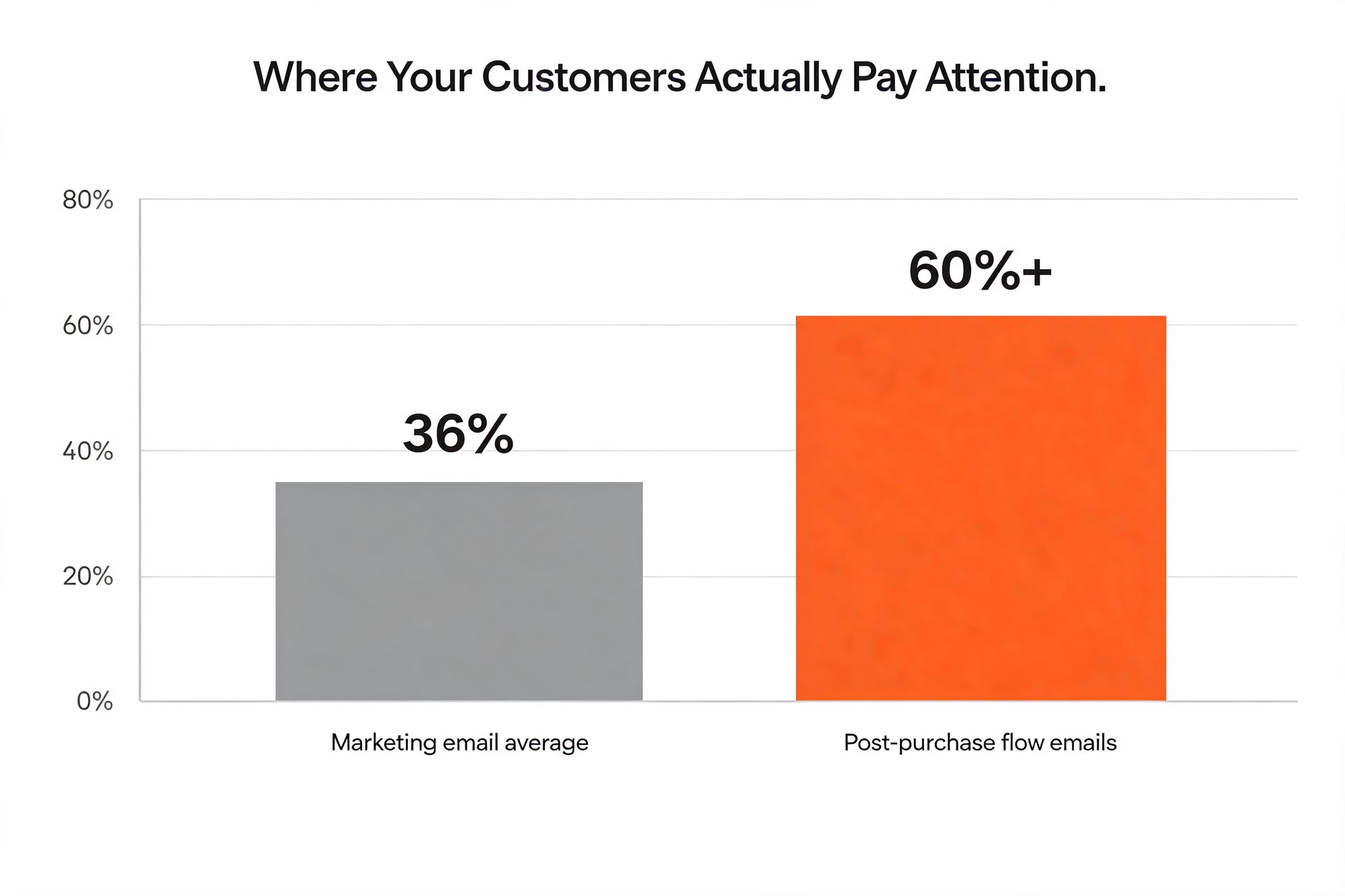
Post-purchase flow emails open at roughly 60 to 62 percent, based on Klaviyo's published post-purchase flow benchmark of about 61.68 percent. The all-industry marketing email average sits near 35.63 percent, by Mailchimp's own benchmark. That's nearly twice as high. These figures move over time, so treat them as a 2026 snapshot rather than a fixed rule.
This isn't a conversion claim. It's an engagement and retention signal, and the reason is simple. A shipping update is expected and individually relevant: the recipient just bought something and is waiting for it to show up. If your marketing engagement has gone flat while your support inbox fills with "where is my order?" questions, this gap is exactly why. The attention you're chasing with campaigns is already sitting, unused, in your shipping notifications.
Because those messages are wanted, they get opened, and they rarely get marked as spam. Low complaint rates keep your emails landing in the inbox instead of a promotions tab. There's no secret deliverability mechanic at work here, just the natural advantage of sending a message someone is actively waiting to receive.
So the real Freshworks vs Mailchimp decision skips right past the highest-engagement window in the entire customer journey. The most valuable communication in eCommerce happens after checkout, not before it, and that's precisely where a marketing-first toolset tends to go quiet. Loyalty and lower support costs are won in that window, and the right tool for it isn't a CRM or a campaign sender at all.
Introducing AfterShip: The Engine for Post-Purchase Communication
If post-purchase is the highest-value window, AfterShip is the system built to own it.
AfterShip isn't a CRM, and it isn't a campaign sender. It's a post-purchase experience platform, and for this decision two layers do the heavy lifting:
- AfterShip Tracking sends proactive, branded shipping notifications and resolves carrier statuses across 1,100+ carriers, so a vague "in transit" becomes a clear, on-brand update.
- AfterShip Email runs marketing and automation fired off real-time delivery events, turning a shipping milestone into a timely, relevant message.
The division of labor between them is precise, and it matters. AfterShip Tracking detects the real-time delivery event, reading the carrier status and pinning down exactly where a shipment is. AfterShip Email fires the automation, sending the right message the moment that event lands. One layer senses; the other acts.
That pairing is what a marketing tool can't reproduce on its own. When an order ships, goes out for delivery, or hits a delivery exception, your customer hears about it without anyone on your team lifting a finger. The same events that used to spawn "where is my order?" tickets become your most-opened messages instead. And because each message is tied to a real shipment event, it lands when the customer cares most, which is the difference between an update they ignore and one they act on.
To be clear, AfterShip Email isn't here to tear out your marketing stack. It's a post-purchase complement, and a migration target when you're ready: you can migrate or sync contacts from Klaviyo, Mailchimp, or Omnisend, then layer delivery-event automation on top of the campaigns you already run. And if you sell on Shopify, a native one-click connection lets you connect deeply with your Shopify store, syncing contacts, tags, and segments and firing automations off real-time shipment status.
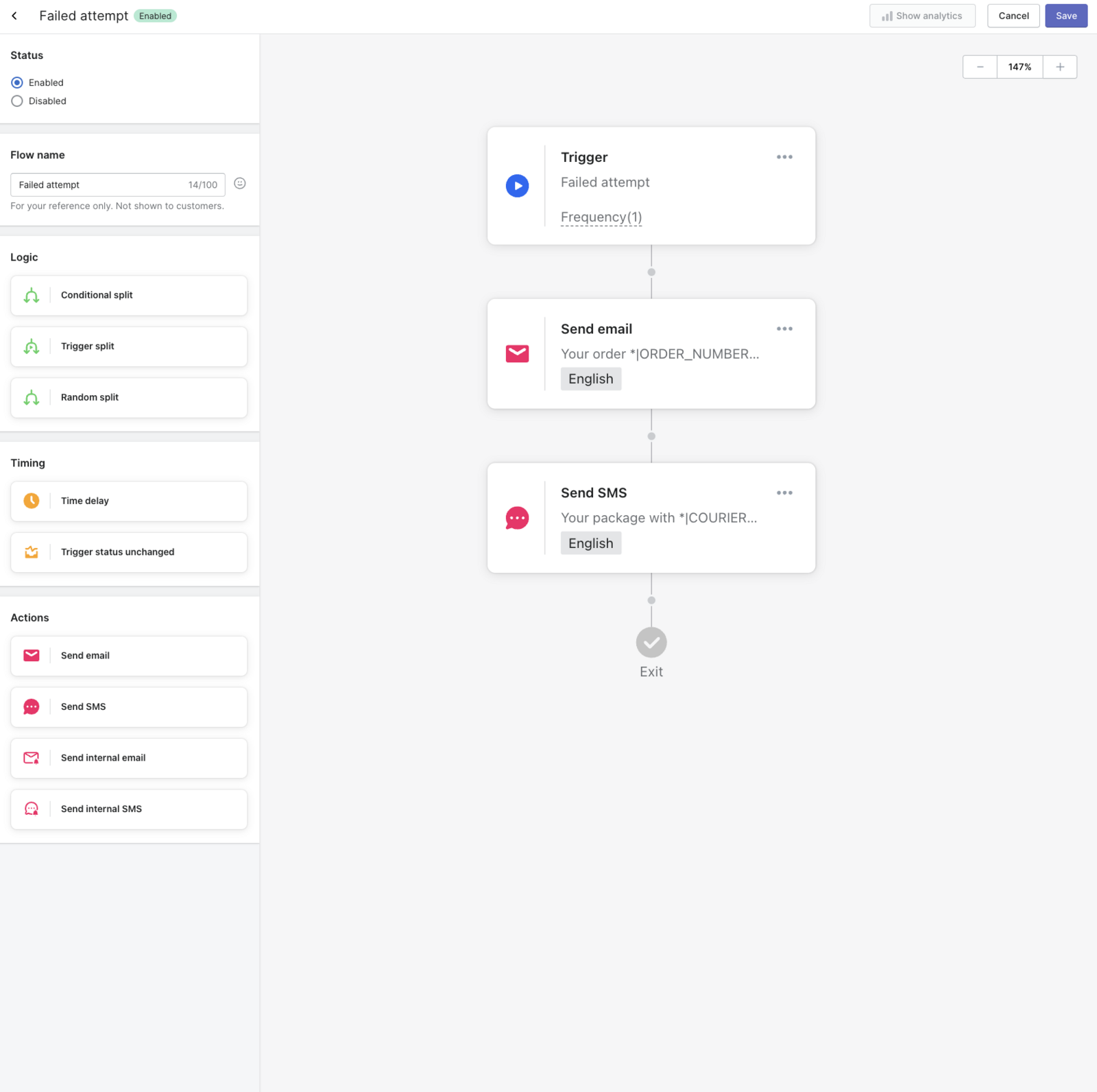
In practice, you set this up once. You pick a shipment-status trigger, and the automation fires every time that event occurs for any order.
That's the engine. The real question is how it stacks up against the tools you were already comparing.
Head-to-Head: What Matters for eCommerce Communication in 2026
Judge these tools on the jobs eCommerce actually needs done, and the picture clears up fast.
A generic feature checklist won't get you far here, because most features read the same on a pricing page. What separates these tools is whether they can act on what happens after the sale. A campaign tool can email a segment. A CRM can log a support case. Neither one knows, on its own, that a specific order just went out for delivery.
So the criteria below aren't lifted from a template. They're the post-purchase jobs that drive repeat revenue and deflect support tickets: proactive delivery notifications, a branded tracking experience, email automation keyed to shipping status, and selling from the tracking page, alongside the baseline marketing and sales-pipeline work each tool was built for. Score the options on those, not on raw feature counts.
Here's how AfterShip, Mailchimp, and Freshworks line up on each one:
| eCommerce Communication Task | AfterShip | Mailchimp | Freshworks |
|---|---|---|---|
| Proactive Delivery Notifications | Yes (Core feature) | No (no native shipment data) | No (no native shipment data) |
| Branded Tracking Experience | Yes (Core feature) | No | No |
| Email Automation by Shipping Status | Yes (e.g., Delivered, Out for Delivery, Failed Attempt) | No | No |
| Driving Sales from Tracking Page | Yes | No | No |
| Basic Marketing Campaigns | Yes (via AfterShip Email) | Yes (Core feature) | Yes (via Freshmarketer) |
| Sales Team Pipeline Management | No | No | Yes (via Freshsales, Core feature) |
The pattern is hard to miss. The post-purchase rows belong to AfterShip, while the pre-purchase campaign and sales-pipeline rows stay with the tools built for them. That isn't a knock on either one; it's a reminder that they were never designed to act on a delivery event in the first place.
One honest caveat on that table: Mailchimp and Freshworks can be wired to shipment data, but only through third-party connectors or custom development. AfterShip ingests it natively across 1,100+ carriers, because the shipment status originates in AfterShip Tracking and AfterShip Email triggers automations off those events. That native pipeline is the capability a standalone CRM or a generic email tool doesn't carry on its own.
If your goal is customer loyalty and lower support costs, the comparison isn't close on the rows that matter most after checkout.
Example: How to Cut "Where Is My Order?" Tickets by up to 70%
Proactive updates don't just calm anxious customers; they erase the question before it's ever asked.
Picture a customer who just checked out. In the old model, they hear nothing until the box shows up, so partway through the wait they email support to ask where it is. Multiply that by every order in a busy week and you have the WISMO pile that's eating your team's time. In the post-purchase model, the same order plays out completely differently from the first minute.
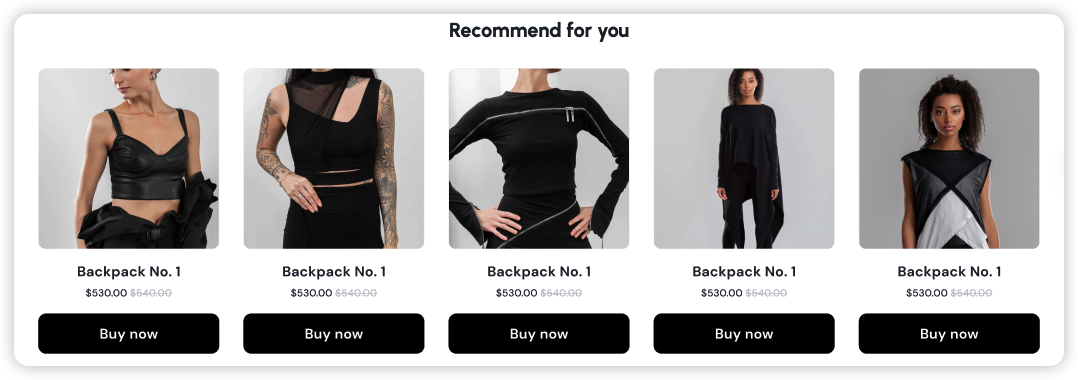
They land on a branded tracking link that matches your store, not a generic carrier page. When the parcel starts moving, a proactive "In Transit" email arrives in their inbox. On delivery day, an "Out for Delivery" SMS hits their phone. The customer is informed at every step, and the support ticket they would have opened never gets written. That same branded page does double duty: while it answers the where-is-my-order question, its upsell modules put relevant products in front of a customer who is already engaged and checking in daily.
This isn't theory. StackCommerce cut WISMO tickets by 71 percent year over year using AfterShip Tracking. The same story reports more than 99 percent shipment-tracking visibility and a 90 percent on-time-delivery rate, against an original goal of just 25 percent.
Read those numbers together and the mechanism is hard to argue with. When customers can see where their order is, they stop asking, and your support queue shrinks alongside the questions.
“AfterShip's shipment tracking is pretty amazing stuff. And I think the 71% drop in WISMO tickets is due to us providing that tracking visibility to our customers.”
Deryck Lim, Sr. Operations Manager, StackCommerce
Read their story →That's the whole point of post-purchase communication. It turns your single busiest support question into a problem you've already solved.
So, When Should You Use Freshworks or Mailchimp?
Sometimes the honest answer is that AfterShip isn't the tool you need, and that's worth saying plainly.
Reach for Freshworks (Freshsales) when your core job is selling, not shipping. It's built for B2B sales cycles, deal-stage tracking, and rep performance, and Freshsales is priced per user because that's exactly who lives in it all day. If you also run complex, multi-departmental support ticketing, Freshworks handles that well. One thing to keep in mind: Freshworks does not natively ingest carrier tracking events, so any shipping triggers would depend on third-party integrations rather than coming built in.
Reach for Mailchimp when you want top-of-funnel reach. It's a solid choice for newsletters, blog updates, and the basic pre-purchase campaigns most brands start with. Its paid plans start from $13/mo (a June 2026 figure pulled from the public pricing page, and list prices shift, so verify before you budget). Where Mailchimp earns its place is the range of top-of-funnel and newsletter tooling on the audience-building side.
That concession is about reach, not campaigns as a whole. AfterShip Email runs marketing campaigns too, on its own pricing ladder that includes a Pro tier, and that Pro tier belongs to Email rather than Tracking. If you're comparing email tools specifically, the right Freshworks comparator is Freshmarketer, which is priced per contact rather than per user. And if you want the full picture of AfterShip Email's plans, there's a breakdown of its pricing and features.
None of this changes the core point. AfterShip is the post-purchase specialist, and it sits alongside whatever marketing stack you already run. When you're ready, you can layer delivery-event automation onto that stack without starting over. The two layers work in concert: your marketing tool keeps running top-of-funnel, while AfterShip handles every message that fires after the order is placed.
The Verdict: Stop Asking Freshworks vs. Mailchimp, Start Winning Post-Purchase
The real decision was never Freshworks vs Mailchimp at all.
For an eCommerce brand focused on retention and operational efficiency, the smart move isn't crowning a winner between a CRM and a campaign sender. It's investing in the post-purchase experience with a purpose-built tool like AfterShip, used alongside the marketing stack you already run.
Be clear-eyed about what AfterShip is not. It isn't a traditional CRM for managing sales leads or deal stages; if that's your primary need, Freshworks (Freshsales) is the purpose-built tool. And AfterShip Email complements a marketing ESP rather than replacing it wholesale. But for nurturing the customers you already have, the most valuable relationship in eCommerce, nothing matches a platform built specifically for the window after checkout.
So stop framing this as one tool versus another. Start winning the post-purchase moment, and the loyalty and lower support costs tend to follow.
Proactive shipment tracking that delights your customers, reduces WISMO tickets, and optimizes your delivery performance.
Book a demoFrequently Asked Questions
A few quick answers to the questions teams ask most when they're weighing this decision.
Frequently Asked Questions
Is Freshworks or Mailchimp better for an eCommerce store?
It depends on the job. Freshworks (Freshsales) is built for B2B sales pipelines and ticketing, and Mailchimp is built for pre-purchase newsletters and campaigns. For the highest-engagement moment in eCommerce, the post-purchase window, neither is purpose-built. A dedicated post-purchase platform like AfterShip is the stronger fit there, used alongside your existing marketing tool.
What is post-purchase communication and why does it matter?
Post-purchase communication is the set of messages a customer receives after they buy: order confirmations, shipping updates, delivery notifications, and returns. It matters because these messages are expected and individually relevant, so they open at roughly 60 percent versus the all-industry marketing average near 36 percent (2026 benchmarks). That makes the window your best opportunity to build loyalty and reduce support load.
How does AfterShip help reduce customer support tickets?
AfterShip Tracking detects real-time delivery events and sends proactive, branded notifications across 1,100+ carriers, while AfterShip Email fires automations off those events. Customers can see where their order is without contacting you. StackCommerce, for example, cut WISMO tickets by 71 percent year over year using AfterShip Tracking.