
The eCommerce Technology Landscape — A Founder's Guide to the Essential Stack

You launched on Shopify, landed your first orders, and went looking for one app to fix one problem. Over 24,000 apps in the Shopify App Store stared back. Suddenly every founder forum is talking about going "composable," running "headless," stacking up "martech," and wiring together a "3PL" and a "WMS," and you are not sure which of it applies to a brand doing a few hundred orders a month.
That overwhelm is the real tax on early growth. It is easy to overspend on tools you do not need yet, and just as easy to bolt together a stack nobody can maintain by month six. Most of the jargon is just unfamiliar vocabulary wrapped around a few simple jobs, and a comprehensive glossary of terms is enough to decode most of it.
Here is the good news: your ecommerce tech stack is far more manageable than the app store makes it look, especially once you are clear on what eCommerce is all about. You do not need to learn every category. You need a reliable way to decide what matters, and when.
This guide gives you that lens. We will map the entire landscape onto something you already understand better than any analyst: your customer's journey.
Your Tech Stack Isn't a List of Tools — It's a Customer Journey Map
Most stack guides hand you a list of tool categories and wish you luck. That framing is backwards. Your customers never experience "categories." They experience a journey, from the first ad they see to the moment a return shows up resolved.
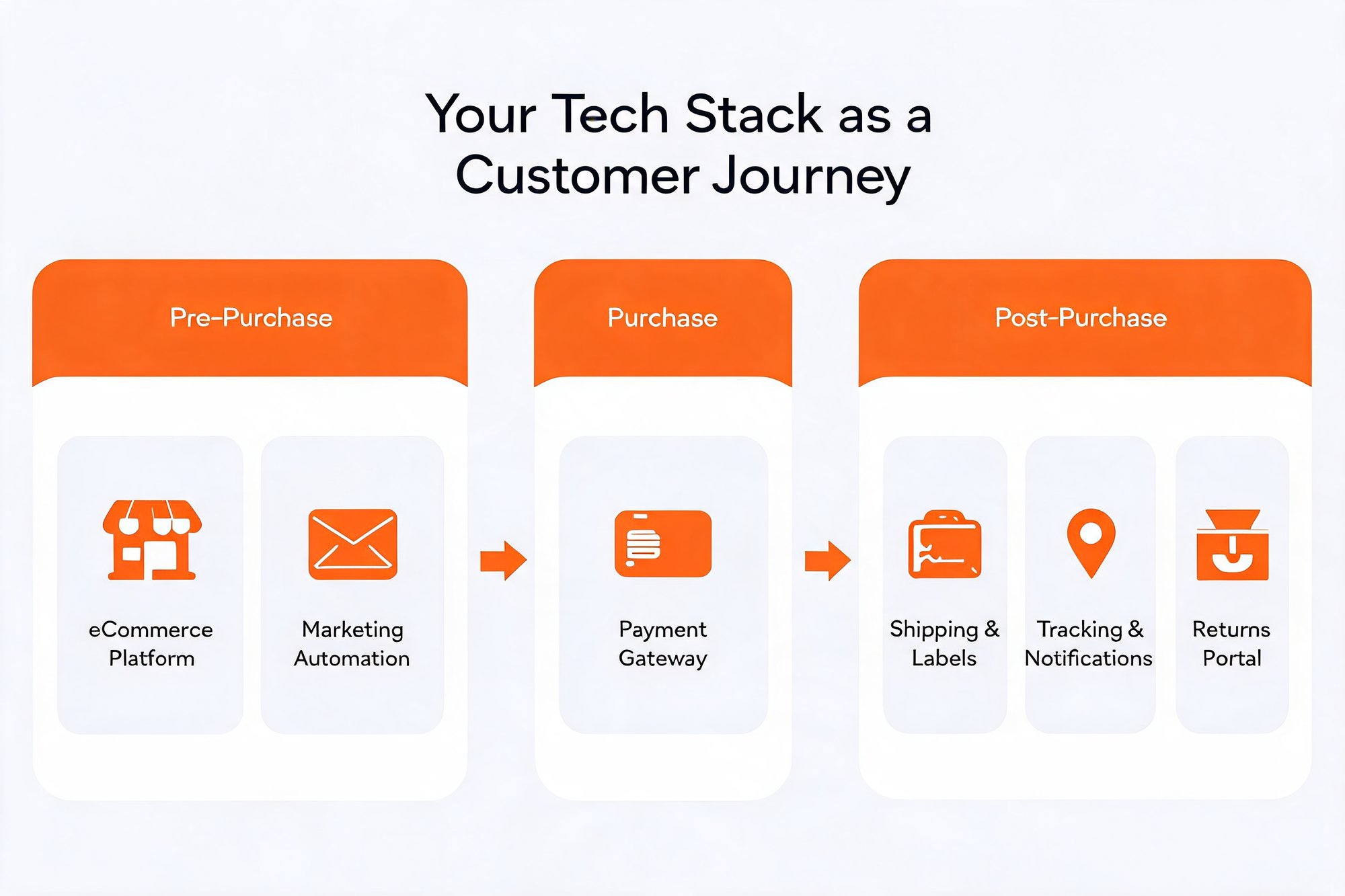
So think of your ecommerce tech stack as support for three stages every customer moves through:
- Pre-Purchase: everything that brings a shopper to your store and convinces them to buy. Your storefront, your marketing, and your pre-sale support.
- Purchase: the checkout itself, where payment has to feel fast, secure, and trustworthy or the sale slips away.
- Post-Purchase: everything after the "buy" click. Getting the order out, keeping the customer informed, and handling returns without friction.
Once you see the stack this way, two decisions get easier. You can tell exactly which stage a shiny new tool actually serves, and you can spot the stage you have been quietly neglecting.
For most growing brands, that neglected stage is the post-purchase stack, where loyalty is won or lost long after the marketing budget has done its job.
It is neglected for an understandable reason. In the early days, nearly all of your attention and budget flow to acquisition, because landing the next sale feels like survival. The work that happens after the sale rarely earns its own line in the budget until support tickets and return headaches force the issue. By then, the customers you paid so much to win are already deciding whether they will buy from you again.
Each stage has one clear job. Get the job right, and the tools almost pick themselves.
The Pre-Purchase Stack: Attracting and Converting Your Ideal Customer
The Pre-Purchase stage has a job that is simple to state and hard to master: bring the right people to your store, then give them a reason to buy. Three tool types carry most of that weight, and the good news for a founder is that the category leaders here are genuinely excellent.
One principle matters before the individual picks. These are not three isolated choices. The tools you select should connect to each other, and to the stages that come later, so customer and order data flows between them instead of piling up in separate silos. The strongest starter stacks are the ones where each tool makes the next one smarter.
- eCommerce platform (Shopify): This is your foundation. Shopify runs your storefront, product catalog, cart, and checkout, and handles hosting, security, and core payments out of the box. That is exactly why most founders start here and stay here through serious scale.
- Marketing automation (Klaviyo): Traffic is wasted if you cannot bring shoppers back with essential marketing strategies. Klaviyo is a powerful email and SMS platform built for ecommerce, with segmentation and automated flows, including a welcome series, an abandoned-cart reminder that can fire within an hour of a cart being left, and win-back campaigns, that do the follow-up you will never have time to do by hand.
- Customer support (Gorgias): Pre-sale questions are conversion moments. Gorgias is a help desk built for ecommerce that pulls order and customer context into one view, so a single agent can answer "does this ship to Canada?" quickly and in your brand's voice.
Notice what these three have in common. Each one owns its stage and does it well. Your job is not to hunt for a "better" replacement for any of them. It is to add the right next piece as each new pain point appears.
That is the discipline this whole guide is built on: match the tool to the stage, not to the hype. A clear ecommerce tech stack is not the longest one. It is the one where every tool has an obvious job.
With the Pre-Purchase stage covered, the next question is what happens at the moment of truth. In the Purchase stage, a few seconds of friction at checkout can undo all the work your marketing just paid for.
The Purchase Stack: Ensuring a Frictionless Checkout
The Purchase stage has one job: take the customer's money quickly, securely, and without making them think twice. It is the shortest stage in the journey and the least forgiving. Every extra field, redirect, or flash of doubt is a reason to abandon the cart.
The numbers make the stakes plain. Baymard Institute, which has studied checkout behavior for years, puts the average documented online cart-abandonment rate at 70.22% as of its September 2025 update. Much of that is casual browsing you cannot win back, but a real share comes from checkout friction you can remove.
Two tool types own this stage:
- Payment gateways (Stripe, Shopify Payments): A gateway authorizes and processes the transaction. Stripe is a developer-friendly powerhouse trusted across global ecommerce, and Shopify Payments is built directly into Shopify, so most founders can accept cards, digital wallets, and local payment methods with almost no setup. Both are strong, secure choices. For a Shopify store, Shopify Payments is usually the path of least resistance, while Stripe gives you more room to customize as you grow.
- Fraud prevention: A faster checkout cannot become a riskier one. Fraud tools, often built into the gateway itself, screen orders for stolen cards and chargeback risk, so you approve good customers and flag suspicious ones without hand-reviewing every sale.
Get this stage right and it disappears. The customer pays, feels safe doing it, and never notices the machinery behind the trust badges and one-click wallets. That is the goal: remove the friction, keep the trust, then move the customer into the part of the journey that actually decides whether they buy from you again.
The Post-Purchase Stack: Where Loyalty Is Won or Lost
This is the stage most founders underbuild, and the one that quietly sets your repeat-purchase rate. The moment payment clears, the experience passes to carriers, inboxes, and your returns process. The post-purchase stack is how you take that experience back and make it your own.
Repeat customers cost far less to sell to than new ones, and the post-purchase experience is what earns that second order. Done well, it makes the acquisition spend from the Pre-Purchase stage pay off twice.
There are four jobs to cover here. AfterShip builds a dedicated product for each, and the easiest way to choose is to start from the job you feel most, not from a product list.
Get orders out the door efficiently. Before a customer can track anything, you have to ship it. AfterShip Shipping handles the operational side: comparing multi-carrier rates, generating and printing labels, and running fulfillment from one screen. It connects to 130+ carriers for label generation, so you can buy the right rate for each order instead of defaulting to a single carrier and overpaying. For a founder, that is the difference between a 20-minute label scramble and a batch printed in one pass. As you scale, automation rules can select the cheapest qualifying rate for each order and validate the shipping address before a label ever prints. That alone cuts the failed deliveries that quietly turn into refunds, reships, and frustrated emails.
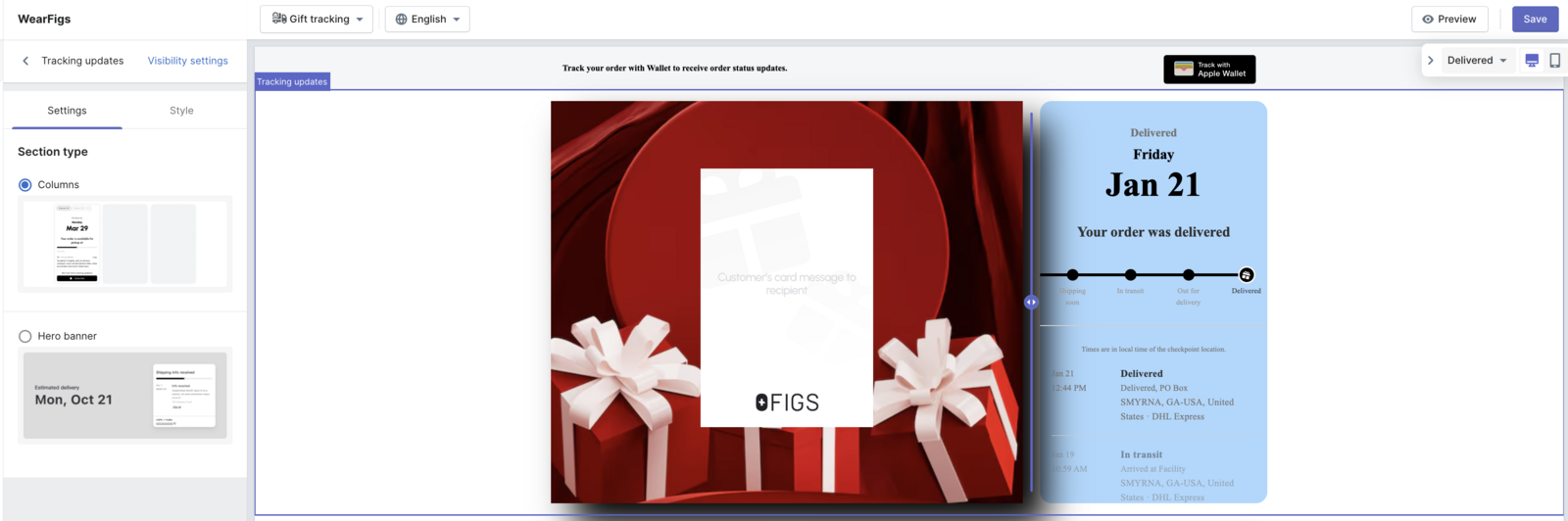
Reduce where-is-my-order tickets. Once an order ships, the questions begin: where is it, when will it arrive, why has it not moved. These "where is my order," or WISMO, tickets can be 10 to 25% of your support contacts, and each one costs roughly $4 to $12 to resolve. AfterShip Tracking gets ahead of them with branded tracking pages and proactive notifications that update customers automatically across the 1,300+ carriers it can read tracking data from. DTC brand Mous cut its WISMO tickets by 54% after putting branded tracking and proactive updates in front of its customers. Those updates meet customers where they already are, by email and SMS, and the branded tracking page itself becomes a marketing surface. Instead of sending shoppers to a generic carrier site, you send them to a page that carries your brand and can point them back to your store.
The payoff is not only fewer tickets. It is trust. In a 2026 Locus survey reported via PRNewswire, 93% of U.S. consumers said proactive updates help offset the negative experience of late deliveries. People forgive a slow shipment far more readily when you keep them informed every step of the way.
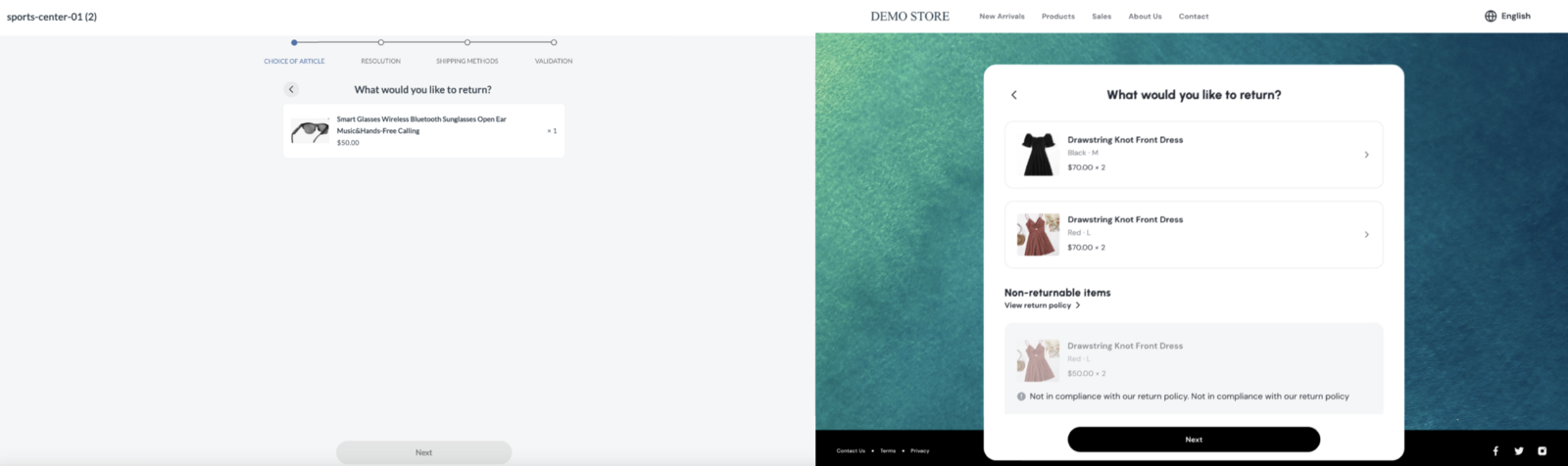
Make returns a positive experience. Returns feel like pure cost until you change how they work. AfterShip Returns replaces the email-and-spreadsheet scramble with a self-service portal where the shopper picks the item, chooses a refund, an exchange, or store credit, and gets a prepaid label or QR code for drop-off. Steering customers toward exchanges and store credit keeps revenue you would otherwise hand back as a refund. A smooth return is one of the strongest reasons a first-time buyer becomes a repeat one. Automated return rules handle routine approvals on your terms, so you only step in on the edge cases instead of processing every request by hand. The faster and clearer the experience, the less a return feels like a breakup.
Learn from the data. You cannot fix what you cannot see. Rather than a single all-in-one dashboard, each AfterShip product reports on its own slice of the post-purchase stack. Tracking shows you fulfillment and delivery performance: which carriers run late, where shipments stall, and how often deliveries land on time. Returns shows you the reasons behind returns and how they resolve: what comes back, why, and whether customers take a refund, an exchange, or store credit. Read side by side, those two views tell you where customers drop off and where you are losing margin. That turns a hunch into a decision. If one carrier is chronically late in a region, you can shift volume away from it. If the same product keeps coming back for the same reason, you can fix the listing, the sizing, or the packaging before it costs you more.
One practical note on how this fits together. AfterShip is not a single SKU you flip on. You start with the product you need most, usually Tracking, and add Shipping and Returns as your volume grows. They live in one account and share your order data, so they behave like one post-purchase foundation even though each is billed as its own product. Running several together also unlocks bundle pricing, so consolidating your post-purchase tools generally costs less than buying each one piecemeal.
That shared data is the quiet advantage. Your shipping, tracking, and returns stop being three disconnected apps and become one connected view of everything that happens after checkout. Build that foundation early and it grows with you, which is exactly what a smart starter stack is designed to do.
A Founder's Starter Stack for 2026
You do not need a custom-built platform to launch, and a beginner's guide to getting started is enough to find your footing. For most DTC brands starting today, four tools cover the entire customer journey and work far better together than apart. Here is the opinionated starter stack we would set up, in order:
- Shopify, for your storefront and checkout. It runs the Pre-Purchase and Purchase stages out of the box. A one-click app connects it to AfterShip, so orders, fulfillment status, and tracking sync automatically with no manual exports.
- Klaviyo, for marketing automation. It owns your email and SMS. Because AfterShip registers post-purchase events as native Klaviyo metrics, you can trigger flows on them directly. A "Return request Approved" event can fire a branded "your refund is on the way" email without you touching code.
- Gorgias, for customer support. It centralizes your tickets. The AfterShip Returns widget appears right inside each Gorgias ticket, so an agent sees the original order, the return reason, and the refund or exchange details without leaving the conversation.
- AfterShip, for the post-purchase stack. This is the stage the other three do not cover: shipping, tracking, and returns. You can start it for almost nothing.
That last point matters when you are watching every dollar. You can start AfterShip Tracking free, up to 50 shipments a month, with a branded tracking page included. AfterShip Shipping gives you free labels to begin with, and AfterShip Returns starts at $16 a month. You can put real post-purchase infrastructure in place before it costs you much at all.
The point of this stack is not that four apps happen to be installed. It is that they talk to each other. Shopify orders flow into AfterShip automatically, a return approval can fire a Klaviyo email, and your Gorgias agents see return details inside the ticket. Each tool makes the next one smarter.
Common Pitfalls When Building Your First Tech Stack
Even a clean stack goes sideways for predictable reasons. Three pitfalls trip up most first-time founders.
Pitfall 1: Solving problems you do not have yet. Don't buy enterprise tooling, a headless rebuild, or a full warehouse management system at 200 orders a month because an article told you to. Do add each tool when a real pain actually shows up. The right time to buy a returns platform is when returns start eating your week, not before.
Pitfall 2: Ignoring integrations. Don't pick the best-reviewed tool in each category in isolation and assume they will cooperate later. Do confirm your choices connect before you commit. A slightly less feature-rich tool that syncs natively beats a powerful one that leaves you copying data between tabs by hand.
Pitfall 3: Underinvesting in post-purchase. Don't pour your budget into ads and the storefront while treating shipping, tracking, and returns as an afterthought. Do fund the post-purchase stack as deliberately as the front end. A customer who cannot find their order, or who fights with a clunky return, rarely writes you an angry review. They simply never come back, and then you pay all over again to acquire their replacement.
Proactive shipment tracking that delights your customers, reduces WISMO tickets, and optimizes your delivery performance.
Book a demoFrequently Asked Questions
What is an eCommerce tech stack?
An ecommerce tech stack is the set of tools that support your customer's journey from the first click to the final delivery and return. The clearest way to organize it is by stage: Pre-Purchase, Purchase, and Post-Purchase. Each stage has one job, and each tool should serve one.
What tools do I need for post-purchase?
The post-purchase stack covers shipping, tracking, notifications, and returns. In practice that means a tool to buy labels and compare carrier rates, a tool for branded tracking pages and proactive updates that cut where-is-my-order tickets, and a self-service returns portal. AfterShip offers all three as separate products that share one account and your order data.
What is a good starter tech stack for a new business?
For most DTC brands in 2026, a strong starter stack is Shopify, Klaviyo, Gorgias, and AfterShip. That combination covers every stage of the journey, and the four connect natively rather than just sitting side by side. You can begin on the free and low-cost tiers and scale each tool up as your volume grows.
Your Stack Will Evolve, But Your Foundation Shouldn't
The specific tools in your stack will change. You might switch email platforms, add a loyalty app, or move to a new theme. That is normal and healthy. What should not change is the framework underneath it: the three-stage customer journey that tells you what each new tool is actually for.
Anchor your post-purchase stack early and it scales with you instead of against you. A founder can start on AfterShip's free and low-volume tiers. As you grow into the $1M to $10M range, you move up to Premium and Pro plans that add custom-domain tracking pages, AI-predicted delivery dates, deeper automation, and API access. At enterprise scale the same products stretch much further; AfterShip supports brands like eBay, which moves more than 200,000 packages a month.
That is the advantage of building on a foundation that grows from 100 orders to 100,000. You are not rebuilding your post-purchase stack every time you level up. You are turning on more of what is already there.
If you want to size the upside before you commit, AfterShip's returns ROI calculator can model potential savings from your own numbers: your order volume, average order value, return rate, and processing time. Treat the result as an illustrative projection from the inputs you give it, not a guaranteed outcome, and use it to decide where post-purchase investment pays back first.
Build the foundation once, keep the customer-journey framework in your head, and every future tool decision gets simpler instead of scarier. That is what it means to own a stack that works for you, rather than one you are forever fighting to hold together.