
Which Courier Tracking API is Best? A Developer's Verdict


Beyond the Feature List: What Developers ACTUALLY Need from a Tracking API
Your PagerDuty is blowing up at 2 AM because a third-party tracking API is down again. You're tired of debugging inconsistent schemas and chasing failed webhooks. You don't need another "feature-rich" platform; you need an API that treats reliability as its most important feature. Let's compare the top tracking APIs on the metrics that actually matter to an engineer.
Most courier tracking API comparisons are written for a buyer skimming a feature grid, not the engineer who has to keep the integration alive during peak season. They count checkmarks (branded pages, "real-time updates," dashboards) and skip the things that decide whether your integration survives a traffic spike or a carrier outage. A feature you can see in a screenshot tells you nothing about how the API behaves under load, how it fails, or what it costs you in on-call hours over two years.
For a production system, the evaluation criteria are narrower and harder to fake. Score any contender on these five:
- API uptime and reliability, and whether it's contractually guaranteed. A status page showing good numbers is table stakes; a signed, credit-backed SLA is a different commitment. Know which one you're actually getting.
- Webhook performance and retries. When your endpoint returns a 503 during a deploy, how many times does the API retry, over what window, and on which response codes? Shallow retry logic turns one bad minute into permanently lost events.
- Documentation quality and developer experience (DX). Accurate, current docs with working quickstarts and a stable object model are the difference between a half-day integration and a two-week one.
- Carrier network breadth, and normalization. Raw carrier count is marketing. What matters is how many carriers you can track through one consistent schema, not how many you can buy a label from.
- API design and schema consistency. One stable response shape and one status enum across every carrier means one parser. Inconsistent schemas mean per-carrier special-casing that compounds as you add carriers.
These are measurable, and they map directly to total cost of ownership: each one shows up later as either engineering time you didn't spend or an incident you didn't have. The rest of this review scores three APIs against exactly these five, starting with the data.
The Contenders: A Head-to-Head Technical Comparison
The three APIs worth a serious developer's time are AfterShip, EasyPost, and Shippo. All three started in shipping, but they are not interchangeable for the tracking use case, and the most common mistake in these comparisons is treating their headline carrier numbers as if they measure the same thing.
They don't. AfterShip's 1,300+ is a count of carriers you can track through a read-only tracking integration. EasyPost's "100+" and Shippo's "40+," per each vendor's own product materials, are label/shipping-scope counts: the carriers you can buy and print labels for. Shippo's true tracking-carrier coverage sits closer to roughly 40 to 85. Put those figures in one row without flagging scope and you're comparing a tracking count against a labels count, which is the exact apples-to-oranges error this section avoids. The table below holds every cell to tracking-API scope and calls out where a competitor's number is a shipping count instead.
| Criteria | AfterShip | EasyPost | Shippo |
|---|---|---|---|
| Uptime / SLA | Publishes numeric per-API uptime (~100%); contractual 99.9% Service Uptime SLA from Silver support tier ($200/mo min per product) | Publishes 90-day per-component uptime history (fluctuates monthly); SLA via plan/contract | Publishes status; no comparable published tracking SLA |
| Webhook retries | Up to 14 attempts, exponential backoff, ~68 hours total; retries on any non-2xx; 10-URL cap; ports 80/443/8080 | Up to 6 retries; 7-second response timeout | 2 retries (on 408/429/5XX); expects 2XX within ~3 seconds |
| Documentation / DX | Standardized status taxonomy + subtags, consistent courier slugs, stable tracking object, three-panel docs and quickstart | Documented API; smaller normalization surface | Documented API; tracking is secondary to labels |
| Carrier breadth | 1,300+ tracking carriers (tracking scope) | 100+ (label/shipping scope) | 40+ (label/shipping scope; tracking scope ~40-85) |
| Schema consistency | One stable object + normalized status enum across all carriers | Narrower normalization | Narrower normalization |
| Rate limits | Per-endpoint (POST /trackings 20/s, GET 6/s, GET /:id 5/s, detect 3/s); 429 + X-RateLimit headers | 5 req/s across Index endpoints; 429 on overage | ~POST 750/min, GET 500/min |
Read the table top to bottom and a pattern emerges. On the criteria that are cheap to demo (a documented API exists, a status page exists), the three look similar. On the criteria that are expensive to engineer (retry depth, normalization surface, tracking-carrier breadth, per-endpoint rate control), they diverge sharply. That divergence is the whole verdict.
The Verdict: Why AfterShip's API is the Professional's Choice
For developers building scalable, mission-critical logistics systems (scaling brands, 3PLs, and marketplaces), the AfterShip Tracking API is the clear choice. The case isn't a longer feature list; it's depth on the four things that become technical debt at volume: the widest tracking-carrier breadth (1,300+), a normalized schema that lets one parser handle every carrier, the deepest webhook retry behavior of the three (up to 14 attempts over roughly 68 hours), and AI estimated delivery dates that hold up across a real shipment mix.
Reliability is where this has to stay honest, because two different things get conflated constantly. The first is observed uptime, which AfterShip publishes live and per-API for anyone to inspect. The second is a contractual guarantee, which is a paid line item, not a default.
At or near 100%: that is AfterShip's live, per-API uptime as published on its public status page, and you should re-verify the current figure at publish rather than trust a number baked into an article. The value on any given day matters less than the fact that it is observable by a skeptical engineer on a public status page, not asserted from a private source you cannot audit.
That public number is not the same as a signed promise, and the gap deserves a plain statement. AfterShip's API has publicly tracked 99.9%+ uptime, but the contractual, credit-backed 99.9% SLA begins at the Silver support tier (from $200/mo per product). At the scale this article is written for, that signed guarantee is precisely what you are buying.
So the verdict comes with a boundary. If you ship under 100 packages a month, a simpler, cheaper tool is a perfectly rational choice; you'll trade away normalization depth, retry headroom, and a signed reliability guarantee you probably don't need yet. The moment your tracking volume, carrier count, and on-call burden start to scale, those trades reverse, and engineering depth plus a contractual SLA become the cheapest insurance you can buy.
One honest caveat keeps that verdict precise: AI estimated delivery dates and branded tracking are not AfterShip-exclusive (Shippo bundles both in a roughly $17/month tier), so treat them as table stakes rather than differentiators. AfterShip's real edge at scale is the engineering depth and the signed reliability guarantee, not a feature a cheaper tool also ships.
Deep Dive: Unpacking AfterShip's Developer Experience (DX)
The verdict rests on one engineering claim: AfterShip normalizes the chaos of global carriers into a single, predictable surface, so you write one integration instead of one per carrier. That starts with identifiers. Every courier resolves to a consistent lowercase slug (usps, fedex, dhl) that is identical across every endpoint, so the value you read off a tracking object is the same value you pass back into a query. No per-carrier casing quirks, no aliases to reconcile.
Status is where most tracking integrations rot, and where normalization pays off most. AfterShip maps every carrier's idiosyncratic status language onto one fixed taxonomy of nine tags: Pending, InfoReceived, InTransit, OutForDelivery, AttemptFail, Delivered, AvailableForPickup, Exception, and Expired. Each tag is refined by a standardized subtag, for example InTransit_001, when you need finer granularity.
Exception states get the same treatment, down to subtags like Exception_007. Your state machine keys off that enum, not off free text strings that vary by courier and change without warning.
The payoff is a stable tracking object shape (id, tracking_number, slug, tag, subtag, checkpoints, and the rest) that holds across all 1,300+ carriers. One parser, every carrier. When you onboard a new courier, you do not touch your parsing layer, because the response looks the same as it did for the previous 1,299. And for a carrier you cannot identify up front, POST /couriers/detect takes a tracking number and returns the candidate slugs, so detection is an API call rather than a regex you maintain by hand.
Documentation is the other half of DX, and it is the half competitors most often neglect. AfterShip ships current, organized reference docs and working quickstarts: navigation, explanation, and copy-pasteable code examples in one view, which is the difference between integrating in an afternoon and reverse engineering behavior by trial and error. Read the EasyPost and Shippo docs side by side and the gap is structural, not cosmetic. Per their own documentation, EasyPost exposes a narrower normalization surface, and Shippo treats tracking as secondary to label creation, so its tracking object and status handling get less of the schema discipline you are relying on. Thinner normalization is debt you inherit the first time a carrier reports a status your code has never seen.
Webhooks That Work: The Key to Proactive CX and Lower Costs
Webhooks are how a tracking integration earns its keep, because every status change you receive and act on is a "where is my order" ticket your support team never works. Miss the event and the customer emails you instead. So the question is not whether an API sends webhooks, it is what happens when your endpoint is briefly down and the delivery fails.
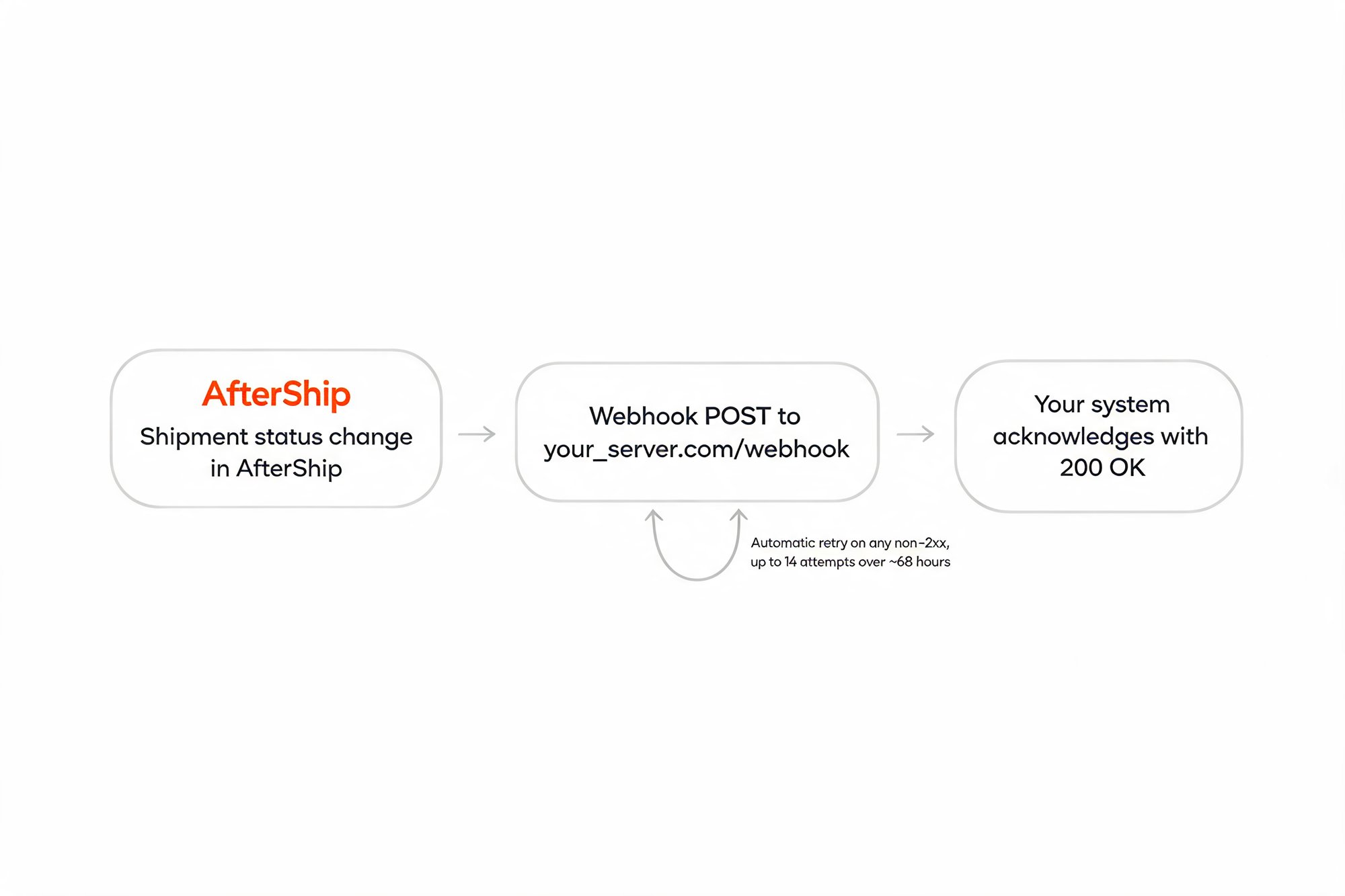
AfterShip's answer is the deepest of the three. It retries a failed webhook across roughly 68 hours, using exponential backoff over up to 14 attempts, and it retries on any non-2xx response rather than a narrow set of error codes. You can register up to 10 webhook URLs per account, and your receiving endpoint must listen on port 80, 443, or 8080. One honest constraint: there is no self-serve manual replay of a specific failed event, so pair that long retry window with a reconciliation pattern, polling GET /trackings to catch anything that slipped through. About 68 hours across up to 14 attempts is wide enough that a routine deploy or a short outage will not cost you events.
Compare the competitors on their own published behavior. EasyPost, per its docs, retries a failed webhook up to 6 times and expects your endpoint to respond within 7 seconds. Shippo, per its docs, retries twice and only on 408, 429, or 5XX responses, expecting a 2XX within about 3 seconds. Both are workable at low volume, but a 7 second timeout or a two attempt ceiling leaves far less margin when your system has a rough few minutes during peak. Retry depth is exactly the kind of capability that looks identical in a feature list and behaves very differently in an incident.
Getting Started: Your First API Call in Under 5 Minutes
You can be tracking your first shipment in a few minutes. Install the official SDK, set your API key, and create a tracking. The package is @aftership/tracking-sdk (v16.0.0, Node.js 16+), the base URL is https://api.aftership.com, and the current API version is 2026-01. Grab a key from the API keys page in your account, and keep the API quickstart guide open for the full reference.
// npm i @aftership/tracking-sdk   (Node.js 16+)
import { AfterShip } from "@aftership/tracking-sdk";

const aftership = new AfterShip({ api_key: "YOUR_API_KEY" });

const result = await aftership.tracking.createTracking({
  tracking: {
    tracking_number: "1234567890",
    slug: "usps" // omit to let AfterShip auto-detect the courier
  }
});

console.log(result.tracking.id, result.tracking.tag); // normalized status
Prefer to see the raw HTTP call? The same request without the SDK shows the as-api-key authentication header explicitly:
const res = await fetch("https://api.aftership.com/tracking/2026-01/trackings", {
  method: "POST",
  headers: {
    "as-api-key": "YOUR_API_KEY",
    "Content-Type": "application/json"
  },
  body: JSON.stringify({
    tracking: { tracking_number: "1234567890", slug: "usps" }
  })
});
const data = await res.json();
console.log(data);
Both create the same tracking and return the normalized status in result.tracking.tag. Register a webhook against that tracking and you have a working, proactive pipeline.
Proactive shipment tracking that delights your customers, reduces WISMO tickets, and optimizes your delivery performance.
Book a demoFrequently Asked Questions by Developers
How does the API handle carrier-specific tracking number formats?
You do not special-case carriers. Pass a tracking number with a lowercase courier slug (usps, fedex, dhl), or omit the slug and call POST /couriers/detect to get the candidate slugs back. Every carrier's native statuses map to the same nine-tag taxonomy (Pending, InfoReceived, InTransit, OutForDelivery, AttemptFail, Delivered, AvailableForPickup, Exception, Expired) plus standardized subtags, and the tracking object keeps the same shape across all 1,300+ carriers. One parser handles every format.
What are the API rate limits?
Limits are per endpoint, not one global bucket. For example, POST /trackings allows 20 requests per second, GET /trackings 6 per second, GET /trackings/:id 5 per second, and POST /couriers/detect 3 per second. Exceed a limit and the API returns HTTP 429 with X-RateLimit-Limit, X-RateLimit-Remaining, and X-RateLimit-Reset (a Unix timestamp) headers; read X-RateLimit-Reset to drive backoff. Build separate per-endpoint limiters so ingestion does not starve reads, and route genuine high-volume needs through an Enterprise arrangement.
Can I get historical tracking data via the API?
Tracking records and their full normalized checkpoint history are queryable via the API for 120 days from creation, using GET /trackings/:id or GET /trackings with filters. After 120 days the record is automatically purged, not archived. That window applies across all plans for core tracking data; longer horizons live in the Analytics layer, which is plan dependent. For long-horizon reporting, persist events from your webhook on receipt, or use analytics extended retention.
Which plan do I need to use the API?
API and webhook access begin at the Premium tier. The Free and Essentials tiers do not include API or webhook access, so a developer evaluating the integration needs Premium or Enterprise. Billing is per shipment tracked rather than per API call, so your cost scales with tracked volume, not with how chatty your integration is.