
Automated Refunds for Failed Deliveries: The CX Secret for DTC Brands

Why Your Manual "Failed Delivery" Process Is Quietly Killing Your LTV
A customer's package is marked "Return to Sender" by the carrier at 2 PM. By 2:01 PM, they automatically receive an email: "Hi Name, we noticed a delivery issue with your order. Click here to choose an instant replacement or a full refund." That is not a fantasy. The detection and the alert are automatic; the resolution is one click for the shopper in a branded portal. How does your current process compare?
For most growing brands, the honest answer is: nothing like that. The package sits in a "Return to Sender" status that no one on your team can see. The first signal you get is an annoyed message two days later: "Where is my order? Tracking says it is coming back to you." Now an agent is reverse-engineering what went wrong, opening the carrier site, cross-referencing the order in Shopify, and drafting a one-off apology. Multiply that by every undeliverable, mis-addressed, or rejected package in a month and you have a quiet, recurring tax on your team's time.
That tax is measurable, and the number is exactly what you bring to your Head of Ops.
Industry benchmarks put a single retail or ecommerce support contact at roughly $2.70 to $5.60 to handle. That figure comes from the MaestroQA 2024 Call Center Cost Study, a third-party estimate far more defensible than the inflated, all-industry "cost per ticket" numbers that get passed around. A failed-delivery ticket usually lands at the higher end of that range, because it is rarely one touch. It is the first complaint, the carrier investigation, the follow-up to the customer, and often a manual refund or a re-order pushed through by hand. If even a few percent of your monthly orders throw a delivery exception, those support hours add up faster than the line item on your software bill ever will.
But the support cost is only the part you can see. The expensive part is invisible. A customer forced to chase you about a package they never received has already decided you are unreliable. They may get their refund, but they do not come back. You are not just paying an agent's time; you are paying with the lifetime value of a buyer you already spent good money to acquire. Add the public version of that frustration, the one-star review or the screenshot in a group chat, and a single mishandled exception can cost you many times what the order was ever worth. Treating failed deliveries as a core part of a unified approach to the customer experience, rather than a support afterthought, is what protects that lifetime value.
The root problem is not your team. It is that they are reacting to a failure the carrier already knew about, often hours or days earlier, with no system to catch it the moment it happens.
From Delivery Exception to Loyalty Moment: The Automated Workflow
Here is the reframe that changes the business case: a failed delivery is not only a problem to contain. Handled well, it is one of the highest-trust moments you will ever have with a customer.
Picture the two versions of the same event.
In the "before" version, the customer finds out first. They notice the tracking has stalled or reversed, they feel ignored, and they open a ticket already irritated. Your team scrambles, the resolution drags, and even a full refund leaves a sour aftertaste. The brand looks asleep at the wheel.
In the "after" version, you find out first, the moment the carrier reports the exception, and you reach the customer before they ever have to reach you. The message is short and human: we spotted an issue with your delivery, and here is how to fix it in one click. The customer feels looked after instead of stranded. Many of them will tell you that proactive note was the best part of the entire order. You just turned a logistics failure into proof that you have their back.
That difference is almost entirely about timing and communication, not about the failure itself. Failed deliveries are going to happen. Carriers misroute parcels, addresses have typos, and recipients miss handoffs. What separates a brand that loses the customer from one that earns loyalty is whether the response is automatic and proactive or manual and late. The proactive alert itself can fire automatically through your existing Klaviyo or Attentive flows, or through built-in notifications, so the outreach happens at machine speed while the make-good decision stays in your control. If you have already moved to master your DTC channel automation across marketing and fulfillment, this is the same discipline applied to the one post-purchase moment customers remember most.
At a high level, the workflow has three moves: catch the exception the instant the carrier reports it, tell the customer right away with a clear path to a fix, and let them resolve it themselves without waiting on an agent. How each step works, and exactly where AfterShip Tracking hands off to AfterShip Returns, is the subject of the next section.
How an Automated Refund/Replacement System Actually Works
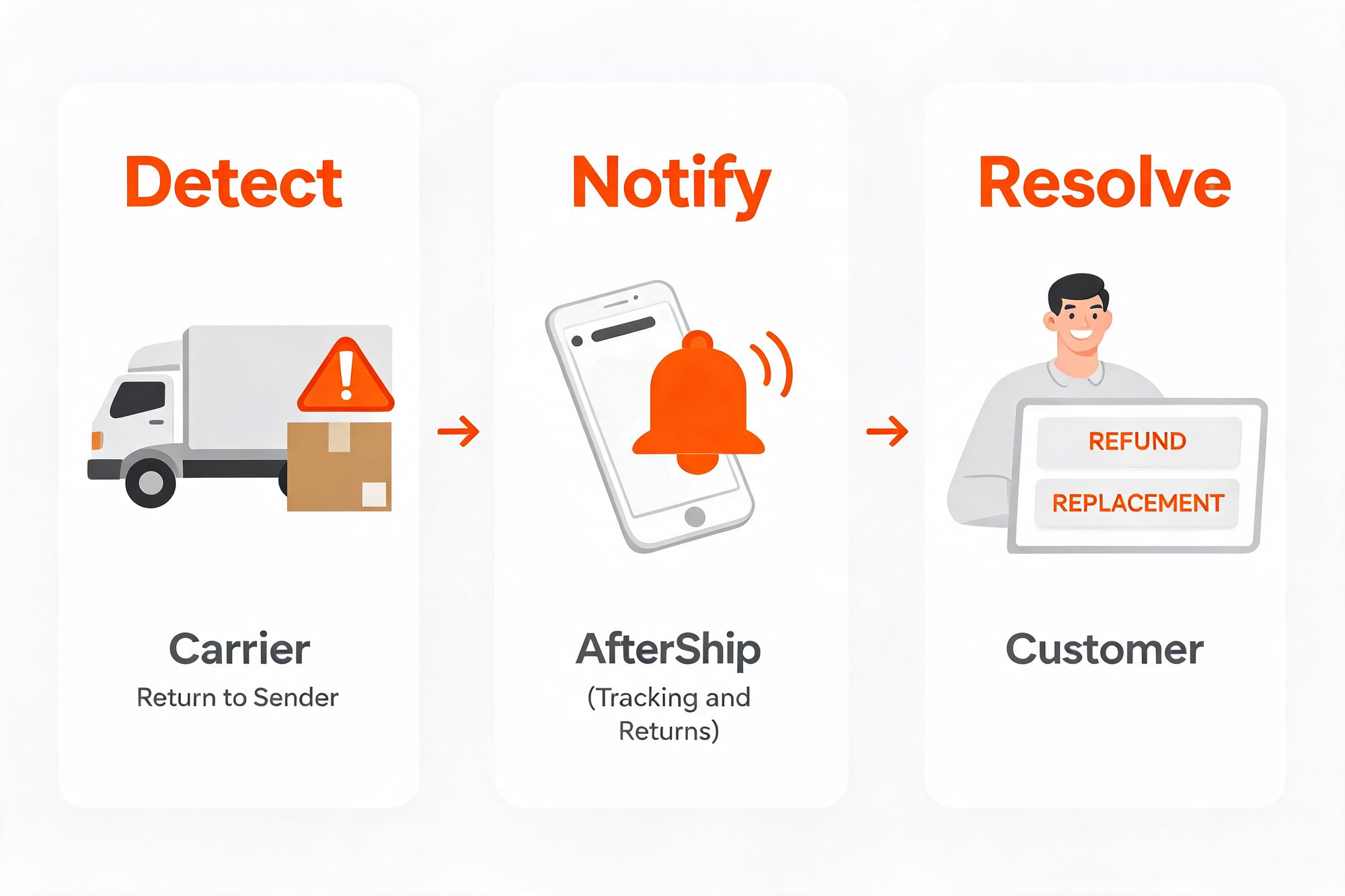
It helps to see what happens under the hood, because the honest mechanism is more interesting than a single magic button, and it is exactly what makes the result reliable instead of reckless. The whole workflow comes down to three moves.
- Detect. Every carrier reports delivery events in its own messy vocabulary. AfterShip Tracking normalizes raw checkpoint data from 1,300+ carriers into nine standardized statuses, so a stalled or undeliverable parcel surfaces as one clear signal: the Exception status. A return-to-sender event is pinned down further by sub-statuses, with Exception_010 meaning the parcel is returning to sender and Exception_011 meaning it has been returned to sender. The carriers describe these moments in their own language: UPS frames an exception as an unexpected error that may shift the scheduled delivery date, while FedEx describes it as an unexpected event preventing delivery. That is exactly why a normalization layer matters in the first place.
- Notify. The moment that Exception event lands, it can fire a proactive alert to the shopper. You can route that alert through your existing Klaviyo or Attentive flows, where the advanced exception triggers run on AfterShip Tracking Premium, or you can use AfterShip's built-in notifications, available from the entry paid tier. Either way the customer hears from you at machine speed, not after a two-day silence.
- Resolve. The alert carries a deep link to a branded self-service portal. There the shopper, or a support agent acting on their behalf, picks the outcome that fits: a refund to the original payment method, store credit, or a replacement of the same item as a variant exchange. For a package the customer never received, there is no return parcel to ship back; the merchant simply approves the make-good and the resolution goes through. There is no separate button labeled "Reship." The replacement is the same item reissued as a new order.
Now for the honest part, because it shapes how you should evaluate this. AfterShip does not offer a single one-click rule that auto-refunds the instant an exception appears. Detection and resolution live in two purpose-built products, AfterShip Tracking for the detection and the proactive alert and a flexible returns management solution for the resolution, and they share one login, one dashboard, and one data model.
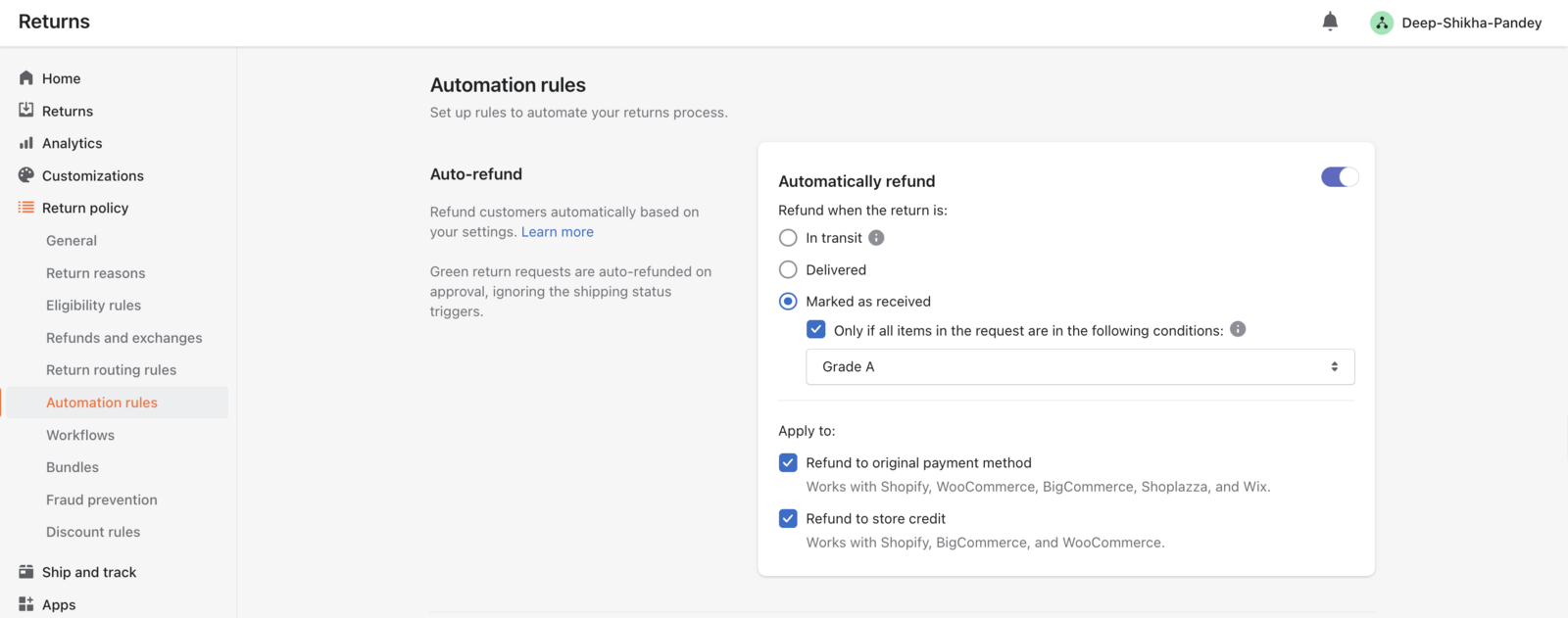
That split is deliberate design, not a missing feature. A blunt "auto-refund on any exception" toggle would treat a $300 order and a $20 order exactly the same, sight unseen, and would hand money back on parcels that are merely running a day late. The two-product handoff lets you insert the right step for the situation: a quiet notification for a minor delay, a self-service portal choice for a clear failure, or a fast agent approval for a high-value order. You automate the parts that are safe to automate, detection and alerting, and you keep human judgment on the one part that should never be blind, the make-good decision itself. The resolution side runs on rules keyed to the return shipment's status, which is precisely what keeps the automation safe.
4 Must-Have Features for a Delivery Exception Management Tool
If you are shopping for a tool for this specific job, the marketing pages will all sound the same. Here are the four capabilities that actually decide whether you can run the workflow above, judged against what a growing DTC brand needs rather than a generic feature grid.
- Deep carrier integration. The tool has to read far more than the big three carriers. Look for one that normalizes raw status codes across 1,300+ carriers into a single, dependable Exception status, including the regional and international carriers your customers actually ship with. Detection is only ever as good as the carrier coverage sitting behind it.
- A branded, self-service portal. The customer should be able to resolve the issue themselves, in your branding, reached through the deep link in the proactive alert. Every failure a shopper fixes on their own is a ticket your team never has to open, and a moment that feels like service instead of an apology.
- Flexible automation rules. You want rules that key on the return shipment's status, the resolution method, and item condition, plus policy routing by product or eligibility. That granularity is what lets you treat a $300 order differently from a $20 one, instead of forcing one blunt setting onto everything.
- Proactive notifications. The alerts are the heart of the experience, so native integrations matter. Look for first-class support for Klaviyo, Attentive, and Omnisend, with the advanced exception flows available on Premium, so the outreach plugs straight into the messaging stack you already run.
Work through those four and you will quickly tell a real delivery exception management tool apart from a label printer with a tracking widget bolted on. If returns are a large part of the picture for you, it is worth taking the time to choose the right eCommerce returns software before you commit.
Putting It Into Practice: Automating Your First Failed Delivery Workflow
The temptation with a project like this is to map every possible failure mode before you launch anything. Resist it. The fastest way to build the business case is to automate one workflow, prove it works, and expand from there. Three steps get you to a measurable result.
First, identify your single most common failure type. For many brands it is an incorrect address, which AfterShip flags as Exception_007, but pull your own data and let it tell you where the volume actually sits. One failure type is plenty to start with.
Second, build one simple proactive-alert flow for that failure and connect it to your branded portal. When the exception fires, the customer gets a clear message and a deep link to fix it themselves. You are not rebuilding your entire support operation; you are wiring up one path, end to end.
Third, measure the before and after on ticket volume for that failure type. Count the "where is my order" contacts you were fielding before, then count them once the alert and portal are live. That delta, in tickets and in agent hours, is the number that justifies the next workflow.
This is not theoretical. Mous, the phone-accessories brand, cut its WISMO contact rate from 12.9% of orders, occasionally spiking toward 20%, down to 5.9% after deploying AfterShip Tracking, which its customer story reports as a 54% reduction in WISMO tickets. That is exactly the kind of before-and-after a Head of Ops signs off on.
“AfterShip allowed us to set up KPI dashboards to see how well everything is going and troubleshoot before it becomes a problem.”
Rosie Jennings, Head of Logistics
Read their story →For a second, independent signal alongside the Mous result, AfterShip's Returns and Exchanges app carries a 4.7 rating across 1,271 reviews on the Shopify App Store, which speaks to the resolution side of the workflow.
Proactive shipment tracking that delights your customers, reduces WISMO tickets, and optimizes your delivery performance.
Book a demoFrequently Asked Questions (FAQ)
What is a delivery exception?
A carrier status meaning an unexpected event may delay or prevent delivery, such as a wrong address, a customs hold, or a return to sender. AfterShip Tracking normalizes these across 1,300+ carriers into one Exception status.
Can I automate refunds for failed deliveries on my Shopify store?
You can automate the detection and the proactive customer alert. The refund or replacement is then resolved in a branded self-service portal or by an agent, because AfterShip's auto-refund rule keys on a return shipment's status. For a never-received order, the merchant issues the refund or sends a replacement without requiring a return parcel.
What is the difference between a failed delivery and a return?
A failed delivery is pre-receipt: the customer never received the item. A return is post-receipt: the customer has the item and sends it back.
How does a "reship" work?
Selecting the same item as a variant exchange generates a replacement order, which is functionally a reshipment. There is no separate button labeled "Reship."
Which AfterShip plan do I need?
Built-in exception notifications are available from the entry paid tier. The advanced Klaviyo and Attentive exception flows require AfterShip Tracking Premium.