
AfterShip vs Tracktor: The Shopify Branded Tracking Verdict


Executive Summary: Who Wins in 2026?
Your Shopify store is growing. That's the good news. The bad news? Your support inbox is overflowing with "Where is my order?" tickets, and your generic tracking link is a dead end for customer engagement. You've narrowed your choices to AfterShip and Tracktor. One is a simple fix; the other is a platform for growth. Let's decide which one your business actually needs.
The short answer, for anyone skimming: AfterShip is a growth platform for scaling brands, and Tracktor is a starter app for new or price-sensitive single stores. If you treat post-purchase as a retention channel and expect to add products, markets, or a second brand in the next year, AfterShip is built for that next stage. If you run one store, watch every dollar, and need a tracking page and nothing more, Tracktor does the job for less.
The scale gap explains the price gap. AfterShip connects to more than 1,300 global carriers through one integration, a figure that grows by roughly 50 carriers a month, and it feeds that delivery data into returns, shipping, and AI delivery estimates on a single account. Tracktor is a tracking-only application built primarily for Shopify. That difference, platform versus app, is the one that drives every comparison that follows, and it is the reason the two tools serve very different stages of a brand's growth.
The Real Reason You're Upgrading: When Basic Tracking Breaks
Basic tracking works fine at 50 orders a month. It quietly breaks somewhere past 500.
At that volume the cracks turn operational. WISMO, short for "where is my order," questions are widely estimated at 30 to 40 percent of all support tickets, and they climb higher in peak season. Each one carries a real cost: Ringly pegs an ecommerce support ticket at roughly $2.70 to $5.60, and live phone support runs higher still. Multiply that across a growing store's WISMO volume and the support hours add up fast.
The cost you will not find on a spreadsheet is the repeat customer who never comes back. Baymard's research finds that 50 percent of consumers rank order tracking as the most important account feature. Klaviyo reports that 1 in 5 consumers stop buying from a brand after a single negative experience (Klaviyo, 2025). A bare tracking link does more than generate tickets. It quietly costs you the second order.
That is the real bill for "good enough" tracking: more support tickets today, and fewer returning customers tomorrow.
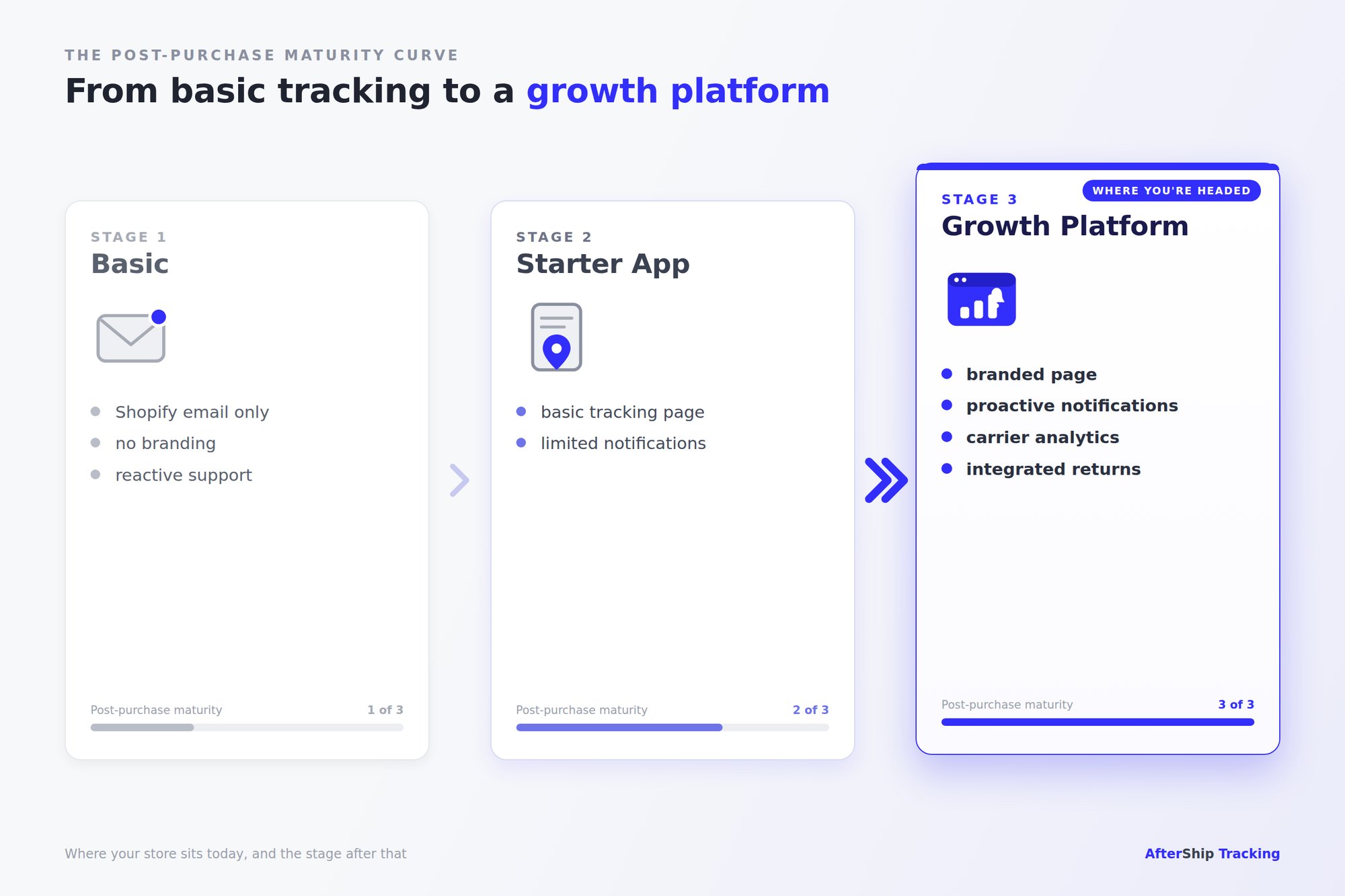
This is where the AfterShip vs Tracktor decision stops being about a tracking page and starts being about the system behind it. A scaling brand needs proactive notifications, a branded post-purchase experience, and analytics that show exactly where shipments slow down. The journey below maps where most stores get stuck, and what the stage after that actually looks like.
AfterShip vs. Tracktor: The Feature-by-Feature Breakdown
The fastest way to see the starter-app versus growth-platform gap is to put the two tools side by side. The table below compares AfterShip Tracking and Tracktor Order Tracking on the criteria that actually shift as you scale: multi-brand support, native Klaviyo events, AI delivery estimates, analytics depth, branded-page customization, and returns.
| Criterion | AfterShip Tracking | Tracktor Order Tracking |
|---|---|---|
| Shopify App Store rating | 4.5/5 across 1,202 reviews | 4.6/5 across 142 reviews |
| Pricing (Shopify App Store) | Free / Essentials $11 per mo / Premium $70 per mo | Free / Lite $4.99 / Starter $8.99 / Essential $49.99 |
| Carrier integrations | 1,300+ read-only tracking integrations that return structured delivery events | 1,700+ couriers (Tracktor's own claim) |
| Proactive notifications | Email, SMS, and Facebook Messenger across 7 delivery checkpoints | Shopify email and SMS |
| Multi-brand / multi-store | Up to 6 organizations per account on all plans; Company console with unlimited orgs on Enterprise | None: separate install and subscription per store, no consolidated dashboard |
| Branded page customization and custom domain | Branded page with your logo on Essentials and up; custom domain on Premium ($70) and Enterprise | HTML and CSS editing plus custom statuses on Essential ($49.99); brand-mark removal on Starter ($8.99); no custom-domain hosting on any published tier |
| Klaviyo integration | Native, 16 shipment-event triggers that fire Klaviyo flows | URL-paste pattern; Klaviyo flows cannot react to shipment status changes |
| AI predictive EDD | Yes: full coverage on 101 carriers, partial on 150+; 95% on-time, 91% single-date, 96% two-day range | No: carrier-provided dates only |
| Gorgias AI WISMO automation | Yes (launched August 18, 2025), Premium and above | Basic Gorgias integration only |
| Analytics depth | Order-to-delivery dashboard, carrier SLA, on-time rate, transit-time percentiles | Delivery and exception reports (higher tiers); no SLA or percentile reporting |
| Returns integration | Native via AfterShip Returns | None |
| API and webhooks | Premium ($70); 10 requests per second per organization | Advanced ($99, not shown on the App Store) |
| Headless storefront | Yes | No (Online Store channel only) |
A few rows reward a closer read, and carrier coverage is the one most likely to mislead you. Tracktor advertises 1,700+ couriers; AfterShip lists more than 1,300. On a raw count, that reads like a point for Tracktor. It is the wrong way to interpret the row.
AfterShip's 1,300+ are read-only tracking integrations that return structured delivery events, not just a courier name on a directory. Those structured events are the raw material for everything downstream: proactive notifications at each checkpoint, AI delivery estimates, and carrier analytics. A courier count tells you how many logos a tool can display. A structured-event integration tells you how much the tool can actually do with each shipment once it is moving. When a tool only knows a courier's name, your notifications and delivery estimates are only as good as what that courier chooses to expose. Structured events close that gap.
Depth beats breadth here, because depth is what automations and reporting are built on. Read the rest of the table the same way: look at what each capability lets you operate, not just whether a checkmark is present. That lens sets up the three advantages that matter most once you are past a few hundred orders a month.
Beyond the Table: 3 Scaling Advantages AfterShip Offers
The table shows what each tool has. The more useful question is what those differences let you do as your order volume and brand count grow. Three advantages separate a platform from an app.
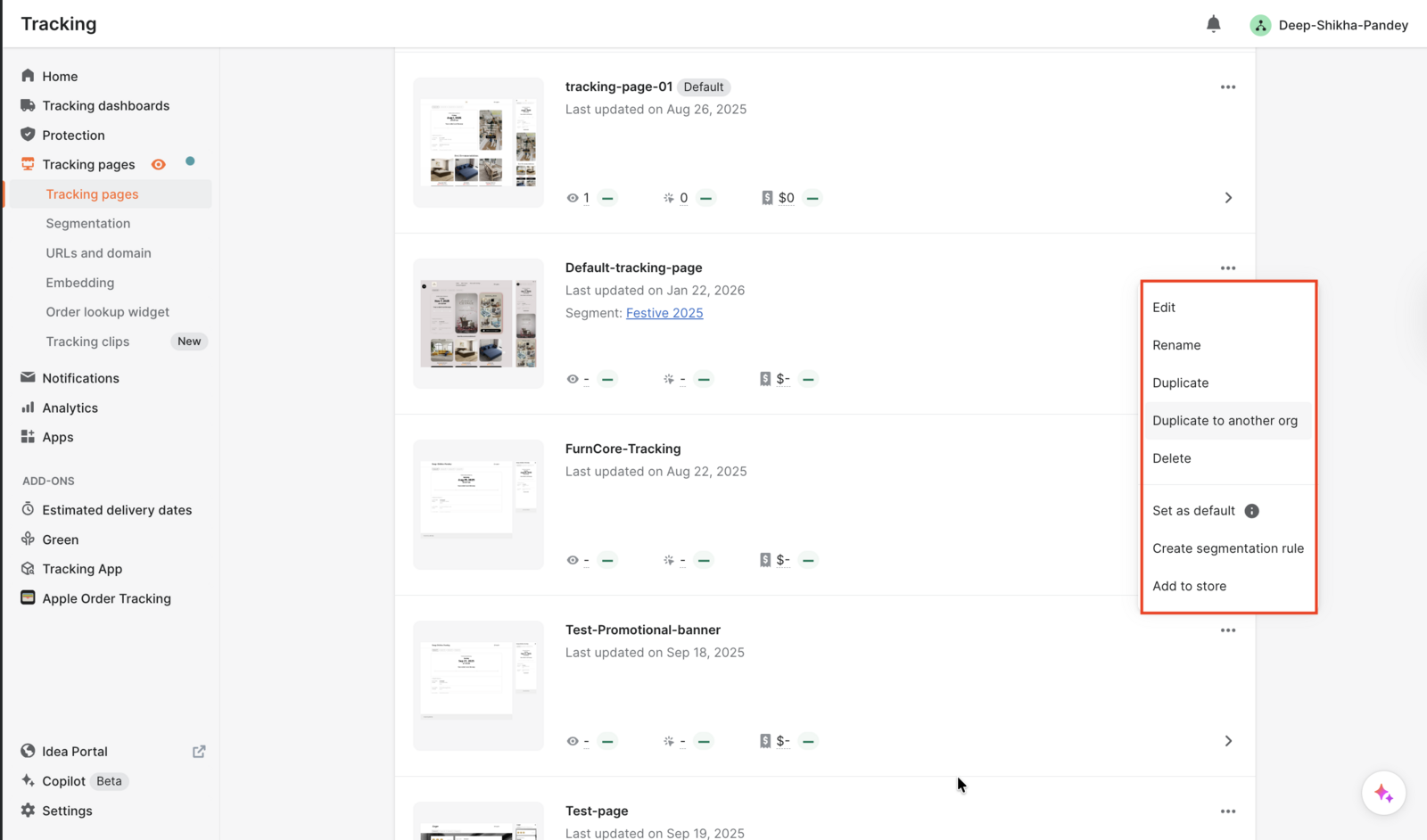
1. True multi-brand management. AfterShip supports up to 6 organizations from a single login on every plan, each with its own products, carrier connections, and billing; brands that outgrow six can consolidate under one Company on Enterprise. For an operator running a flagship store, a wholesale storefront, and a new regional site, that means one dashboard and one dataset across all of them.
Tracktor takes the single-store approach: a separate install and a separate subscription for each store, with no consolidated dashboard. Each storefront is managed from its own Shopify admin. At one store the difference is invisible. At three, the drag is constant. The cost of the single-store pattern is not only the duplicated subscription; it is the reconciliation. Every store you add is another login, another export, and another set of numbers to stitch together by hand at month end.
Here is what consolidation changes day to day:
- One login to manage every brand, instead of switching between separate accounts.
- A single view of delivery performance across stores, rather than siloed per-store reports.
- Notification flows and branding configured once and reused, not rebuilt store by store.
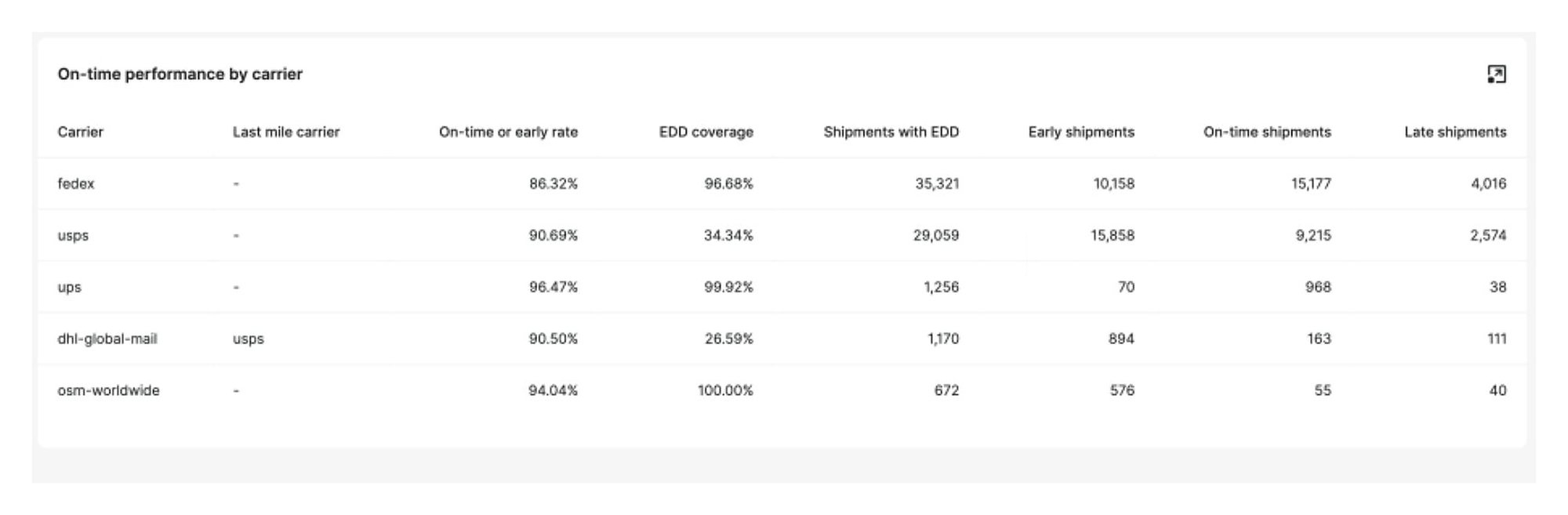
2. Actionable carrier-performance analytics. "You get analytics" is true of almost every tracking tool, so on its own it tells you nothing. The real question is what the data lets you act on. AfterShip's analytics cover order-to-delivery time, carrier SLA performance, on-time rate, and transit-time percentiles, broken out so you can see where shipments actually slow down.
In practice, that means you can:
- Identify a carrier missing its delivery SLA on a specific lane and shift volume to a better performer.
- Use transit-time percentiles to set delivery promises at checkout you can actually keep.
- Catch a rising exception rate on one route before it becomes a wave of WISMO tickets.
Tracktor provides delivery and exception reports on its higher tiers, but no carrier SLA or percentile reporting. You can confirm that an order shipped; it is harder to manage how each carrier performs by lane. None of this is exotic. It is the difference between knowing a package moved and knowing which carrier to stop trusting.
3. The integrated post-purchase platform. The third advantage is the one a standalone tracking app cannot copy. AfterShip provides an integrated tracking, returns, and shipping platform, which makes tracking the entry point rather than the entire product. The same account behind your branded tracking page also runs AfterShip Returns and AI-powered delivery estimates, and ties into a complete post-purchase platform on the shipping side.
The payoff appears when those products run together rather than as four disconnected tools. AI delivery estimates show the compounding effect: because AfterShip ingests structured delivery events rather than a static courier promise, it can predict an arrival window from how a shipment is actually moving. That is a direct payoff of the carrier-depth point above, and it is something a tracking-only feed cannot reconstruct.
Footwear brand Aetrex ran Tracking and Returns on AfterShip and reported an 86 percent reduction in return processing time, a 50 percent cut in operations cost, a 74 percent drop in WISMO tickets, and an NPS gain of 141 points on returns. Those results come from connecting the tracking page, the return, and the delivery estimate into one flow, not from any single feature.
A tracking-only app can trim WISMO tickets. It cannot turn the entire post-checkout journey into one connected experience your customer never has to think about.
That is the real dividing line in the AfterShip vs Tracktor decision: one tool tracks the package, the other runs the whole journey after the sale.
Pricing and ROI: Is AfterShip Worth the Investment?
Let's be direct about price, because it is the one place Tracktor wins cleanly. On the Shopify App Store, Tracktor runs Free, then Lite at $4.99, Starter at $8.99, and Essential at $49.99. AfterShip runs Free, Essentials at $11, and Premium at $70. At every single-store volume, AfterShip costs more. If the lowest sticker price for one store is your only criterion, the decision is already made.
Total cost of ownership tells a fuller story than the entry price. For a single store at 500 orders a month, AfterShip Essentials lands around $43 with overage, against roughly $14 for Tracktor's Starter plan. At 1,000 orders, AfterShip Essentials runs about $83 while Tracktor's Essential plan holds at $49.99 up to its 2,000-order cap. The gap is real, and it widens before it narrows.
Two things change that math. First, once you pass about 1,000 orders a month, the honest move is to request an AfterShip Enterprise quote rather than stack per-shipment overage on a published tier. Second, the comparison flips the moment you run more than one store. Three stores at 1,000 orders each run roughly $390 a month on AfterShip, managed from a single login, versus about $150 a month for three separate Tracktor installs you log into and reconcile one by one. You are paying more for consolidation and platform features, not for a better basic tracking page.
Now reframe the spend as a return. If proactive notifications cut WISMO tickets by 30 percent, that saving repeats every month. WISMO is widely estimated at 30 to 40 percent of support volume, and each ticket carries a cost: Ringly pegs an ecommerce support ticket at roughly $2.70 to $5.60, with live phone support higher still. Apply a 30 percent cut to a few hundred monthly WISMO tickets and the recovered support hours begin to cover the subscription difference on their own.
The brands that scale this way show the pattern. Wine marketplace Vivino treated its tracking page as a revenue channel rather than a status check.
The number that matters: Vivino cut WISMO tickets by 50 percent and saw a 30 percent increase in repeat sales from its branded tracking page and product recommendations.
Vivino
“AfterShip enables global marketplaces to launch and operate new markets by removing the complexity of localized logistics and carriers.”
Christos Iosifidis, VP of Product Management
Read their story →The Final Verdict: Which Tracking App Is Right for Your Shopify Store?
Strip away the feature lists and the choice comes down to where your business is headed.
Choose Tracktor if you process under 100 orders a month, run a single store, watch a tight budget, and need basic order tracking and nothing more. It is a functional, low-cost tracking page, and for that profile it is enough.
Choose AfterShip if you are a growing brand, already run or plan to run multiple stores, treat post-purchase as a retention channel, and need a platform that scales with you instead of one you replace in a year.
One honest caveat before you decide. AfterShip Order Tracking is rated 4.5 out of 5 across 1,202 Shopify App Store reviews, and about 8 percent of those are 1-star. The recurring theme in the critical reviews is features moving between pricing tiers without proactive notice; the clearest dated example is a CDLP review from April 2026 about a custom-domain change. Ask AfterShip's sales team about tier-change communication and overage alerts before you sign.
The Hidden Cost of "Good Enough": Switching platforms 18 months from now will be more disruptive than choosing the right scalable solution today.
If you recognize your store in that second profile, AfterShip Tracking is the place to start.
Proactive shipment tracking that delights your customers, reduces WISMO tickets, and improves your delivery performance.
Book a demoGetting Started with AfterShip on Shopify
Getting AfterShip live on Shopify takes three steps:
- Install AfterShip Order Tracking from the Shopify App Store.
- Connect your store so AfterShip can import orders and sync shipment data automatically.
- Configure your branded tracking page and switch on proactive notifications.
That is the whole setup. For the technical detail of connecting AfterShip to a Shopify store, the integration guide walks through each step.
Frequently Asked Questions
Is AfterShip more expensive than Tracktor?
Yes. On the Shopify App Store, AfterShip is Free, Essentials $11, or Premium $70; Tracktor is Free, Lite $4.99, Starter $8.99, or Essential $49.99. AfterShip costs more because it adds multi-brand management, native Klaviyo automation, AI delivery estimates, carrier analytics, and native returns.
Does AfterShip support multiple Shopify stores from one account?
Yes. AfterShip supports up to 6 organizations per account on all plans, managed from one login. Tracktor needs a separate install and subscription per store with no consolidated dashboard.
Can I use my own domain for the tracking page?
With AfterShip, a custom domain is available on Premium and Enterprise. Tracktor lets you remove its branding on the Starter plan but does not host the page on your own domain.
Does Tracktor have AI-powered delivery estimates?
No. Tracktor shows carrier-provided dates. AfterShip's AI EDD has full coverage on 101 carriers with a 95 percent on-time rate when proactive notifications are enabled.
Which app is better for Klaviyo flows?
AfterShip sends 16 shipment-event triggers into Klaviyo so flows can react to delivery status. Tracktor only lets you paste a tracking link into an email template.