
AfterShip vs Malomo: The Honest Verdict for Shopify Brands with Klaviyo


The Short Answer: Who Wins for Klaviyo-Powered Shopify Brands in 2026?
You've invested heavily in Klaviyo to personalize every touchpoint. But your post-purchase experience is still a black box firing off generic Shopify emails. You know Malomo and AfterShip can fix this by piping tracking data into Klaviyo, but the real question is: which one gives you the granular event data you actually need to build revenue-driving flows?
Here's the verdict before the deep dive. In the AfterShip vs Malomo decision, the right answer depends on how far you intend to push your post-purchase automation.
- Malomo wins for smaller, earlier-stage brands that need one thing: a simple, elegant branded tracking page with a solid Klaviyo connection and nothing more. Note that Malomo is now part of Redo — a returns, shipping, and tracking platform — following Redo's acquisition of Malomo on January 19, 2026, so it now sits inside Redo's broader suite.
- AfterShip wins for brands that want a scalable, complete post-purchase suite with the most granular event data for complex Klaviyo flows. If you plan to branch flows on carrier, location, or delivery-exception type, the depth is already there.
Both AfterShip and Malomo appear in Klaviyo's integration directory and feed tracking events into it. The difference is how many distinct events fire, and how much data rides along with each one. If you want a direct, head-to-head comparison before reading further, that event gap is what the rest of this breakdown measures.
Deep Dive: Comparing the Klaviyo Integration & Event Data
The integration comparison comes down to three things an ops manager actually builds on: how many distinct events reach Klaviyo, how much data each event carries, and whether that data can fire SMS as cleanly as email.
| Klaviyo Integration Dimension | AfterShip Tracking | Malomo |
|---|---|---|
| Flow metrics sent to Klaviyo | 10 on Pro/Premium, 18 on Enterprise | A few core metrics (ShipmentUpdateReceived, OrderIssueCreated, ReturnShipmentUpdateReceived) |
| Status-level granularity | Each status is its own top-level metric (e.g., "Out for delivery," "Failed attempt") | Statuses handled as filters inside ShipmentUpdateReceived; exceptions via OrderIssueCreated |
| Event properties in the payload | 57 named properties (carrier, location, EDD, order) usable as filters and template tokens | Carrier, product, customer, order, and EDD data (full list not published) |
| New Klaviyo event per status change | Yes, a distinct event per status, so flows branch on the metric | Fires ShipmentUpdateReceived per update; branch via status filters |
| SMS trigger support | Same metrics fire email or SMS (enable phone-number sync) | Through Klaviyo (email and SMS) |
| "Shipments stalled" trigger | Available on Enterprise plans | Available via Problem Orders (ShipmentStalled, 72-hr default) |
| Native email/SMS (no ESP required) | Yes | Requires Klaviyo or another ESP |
On event granularity, AfterShip sends up to 10 Klaviyo flow metrics on its public Pro and Premium plans, and 18 on Enterprise. Crucially, "Out for delivery" and "Failed attempt" arrive as separate, independent triggers, not a single bundled status. That separation is what lets you treat a missed delivery differently from a successful final-mile push.
Malomo provides a simplified, tracking-focused integration with Klaviyo. It groups shipment statuses as filters inside a single ShipmentUpdateReceived metric, with exceptions and stalled orders handled through separate metrics. You build flows by filtering one event stream rather than triggering on many distinct status metrics.
Data richness is where the gap widens. AfterShip's advanced integration passes 57 event properties to Klaviyo, available both as trigger filters and as template tokens. That includes carrier name, current location, the AI estimated delivery date, and days in transit. You can split a flow on CourierName or personalize a message with LatestEstimatedDeliveryDate without touching code, and AfterShip's native Klaviyo integration exposes the full property set on both public and Enterprise tiers.
On SMS, neither tool has an inherent edge at the trigger level. The same metrics that fire an email can fire an SMS in Klaviyo. One practical catch: AfterShip sends only the email address by default, so you have to enable phone-number syncing for SMS flows to work. Malomo has no native notifications of its own, so email and SMS run through Klaviyo, using Malomo's prebuilt flow templates as a starting point.
The verdict: AfterShip offers more granular event triggers for Klaviyo automation, and the richer payload is what turns a basic status email into a targeted, revenue-driving flow.
Workflow Showdown: Building a 'Potential Delay' Flow in Klaviyo
Take a common scenario: a shipment sits "In Transit" for several days with no movement. Here's how you build a proactive "potential delay" flow in Klaviyo using AfterShip's data, and where Malomo runs out of room.
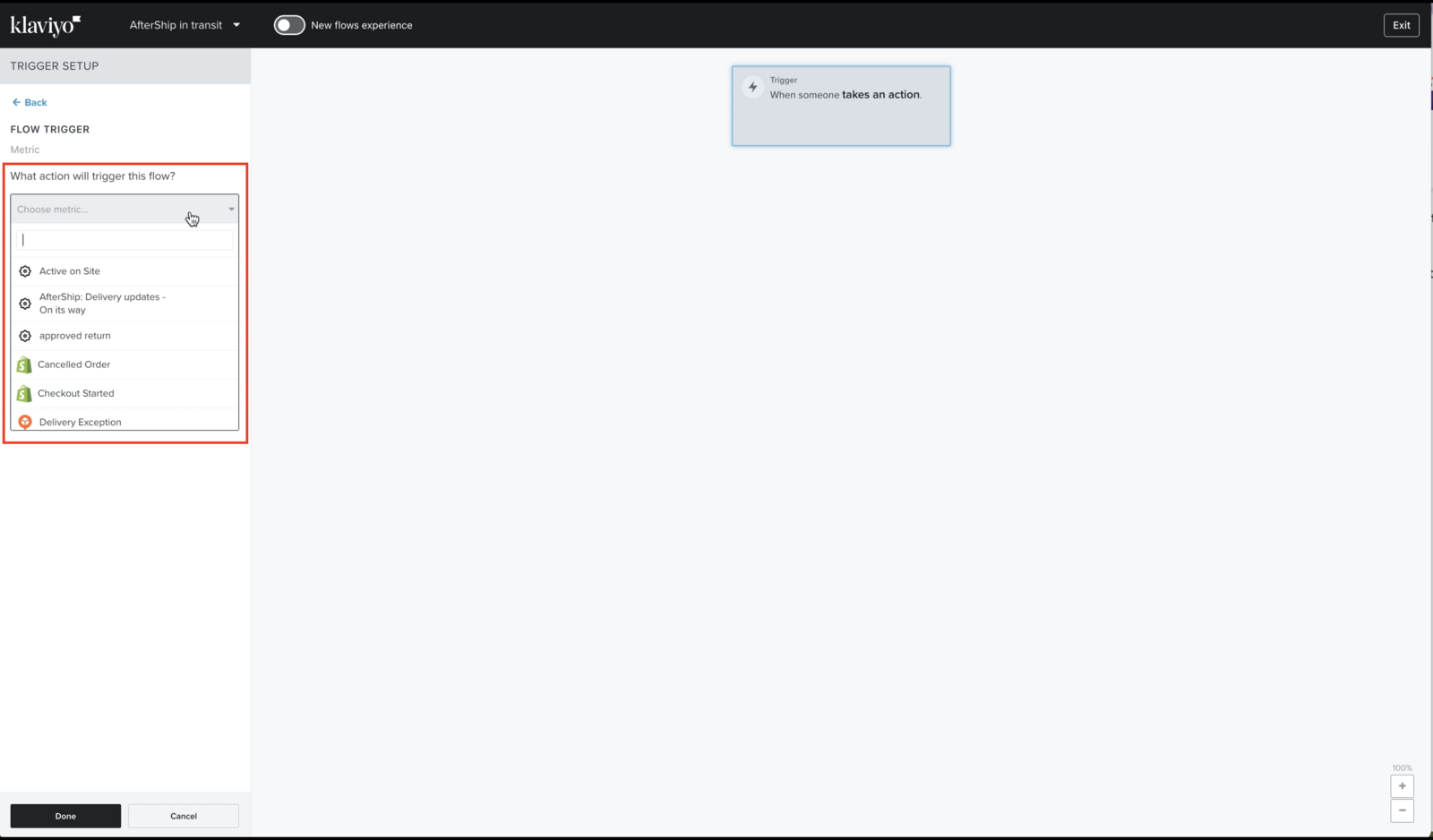
- Set the trigger. Use the
AfterShip: Delivery updates - In transitmetric as the flow entry point. - Add a time delay. Hold the customer in the flow for your threshold, for example three days.
- Branch on delivery. Add a conditional split: if a
Deliveredevent has fired, exit the flow; if not, continue. - Personalize with properties. Pull in
LatestEstimatedDeliveryDate,CourierName, andLatestLocationso the message says something specific, not "your order is on its way." - Send and re-check. Fire the email or SMS, then loop back to re-evaluate before sending a second touch.
On Enterprise plans, AfterShip simplifies this further with a dedicated "Shipments stalled" trigger that fires after a configurable window of carrier silence. On Pro and Premium, that single trigger isn't available, so the conditional-split approach above is the honest workaround. For the technical reader who wants to see how tracking events are passed before building, the integration documentation walks through each metric.
Malomo can build a comparable flow. It offers its own stalled-shipment trigger and feeds shipment, carrier, and order data to Klaviyo, so you can notify customers about a delay. The difference is structural: you filter a single Malomo event stream rather than trigger on a dedicated status metric, and you lean on Malomo's property set rather than AfterShip's named composite EDD field and AI-predicted delivery date. For surfacing a precise revised delivery window, that property depth is where AfterShip pulls ahead.
That's the practical difference: the same Klaviyo canvas, but AfterShip's deeper property set and AI-predicted EDD let the message say more than "still on its way."
Beyond Klaviyo: Branded Tracking Page Customization
Klaviyo flows handle the messaging. The tracking page is where the customer actually lands, and for a mid-market brand it's prime real estate for branding and revenue. Here's how the two tools compare on the page itself.
- Customization. AfterShip gives you control over branding, layout, and CSS, with custom-domain hosting available on Premium plans and above. Malomo takes a different route: it embeds the tracking page directly in your Shopify storefront using Liquid templates or its JavaScript library, so the page lives on your own domain with no DNS setup.
- Upsell and cross-sell. This is where the revenue case lives. AfterShip drives on-page conversion with AI-powered product recommendations that sync your Shopify catalog automatically and let you choose AI, collection, or manual modes. Malomo offers simpler recommendation widgets, typically powered by Shopify's native recommendation API or manual curation.
- Embedded experience. Both let you keep customers on your domain. AfterShip does it through a custom domain or an iFrame embed; Malomo does it natively through its Shopify integration.
One honest trade-off sits inside that first bullet. AfterShip's custom domain needs a CNAME DNS record, which is a quick task for a developer but real friction for a marketing ops manager without dev support. The iFrame embed avoids DNS but requires inserting code into your Shopify theme. Malomo's native embedding sidesteps both, and for a team that wants zero setup, that simplicity is a genuine advantage.
AfterShip's page also surfaces an AI-predicted delivery date and standardized statuses across carriers, so the customer sees a clear ETA even when carrier scans go quiet. That turns the page into more than a place to read a tracking number.
The verdict on the page: Malomo is easier to stand up, but AfterShip gives you more levers to customize and more tools to turn the tracking page into a revenue surface.
Evaluating for the Future: Platform vs. Point Solution
Pick a tracking tool for the brand you're building, not just the brand you have today. This is where the AfterShip vs Malomo decision stops being about a single feature and starts being about architecture.
Malomo is a focused tracking-page tool, and it is now part of Redo — a returns, shipping, and tracking platform — following Redo's acquisition of Malomo on January 19, 2026. On its own, tracking is what Malomo does best; the broader returns, shipping, and delivery-date logic now come from Redo's wider suite rather than from the standalone product.
AfterShip is a multi-product platform for tracking, returns, and shipping. Those products share one data model, so a return event, a shipment, and a delivery estimate all speak the same language and feed the same analytics. As order volume grows, that unified model is what keeps you from stitching together four tools and reconciling four sets of data.

The practical payoff is less tech debt and less vendor management. Every point solution you add is another contract, another integration to maintain, and another data silo to reconcile. A platform folds those into one stack, which matters more every month your order count climbs.
Carrier coverage tells the same story. AfterShip standardizes tracking data across 1,300+ carriers and auto-normalizes it into a consistent set of statuses and sub-statuses. As you add carriers or expand into new regions, that consistency keeps the data feeding your Klaviyo flows clean rather than fragmented.
There's also a quieter dependency to weigh. Malomo has no native email or SMS, so every transactional message routes through Klaviyo or another ESP. AfterShip can send natively, which gives you a fallback that doesn't hinge on flow configuration being perfect.
The verdict: for a brand that expects to add returns automation or shipping management within a year or two, AfterShip's platform removes a migration you would otherwise face later.
AfterShip vs. Malomo Pricing: An Honest 2026 Analysis
AfterShip and Malomo price on completely different logic, and the cheaper line item isn't always the cheaper decision. Here's the honest breakdown for 2026.
AfterShip uses tiered, volume-based plans, and it sells through two public channels with different plan names and prices: the Shopify App Store and aftership.com direct. Disclose which one you're quoting, because they don't match. On the Shopify App Store, paid plans start low, with an Essentials tier around $11/mo for 100 shipments and a $1 first-month promo. Direct plans start at $29/mo but bundle far larger annual shipment quotas. Overage runs roughly $0.08 to $0.12 per extra shipment, with no hard spend cap.
That overage model can surprise you in a flash-sale month. A Shopify Essentials plan that includes 100 shipments would add roughly $150 in overage if you suddenly ship 2,000 orders, which is usually the cue to upgrade a tier.
Malomo uses usage-based pricing with no feature-gating, which is a real advantage for smaller teams. Every feature is available on every plan; only volume and support differ. Its Lite plan runs $49/mo for 1,000 shipments with a low overage rate around $0.05 to $0.06, and Starter steps up to $189/mo for 4,000 shipments, all on month-to-month billing.
Be honest about what that means. Malomo's flat monthly quotas can look simple on a low-volume month, but AfterShip competes on total cost of ownership — one bundled quota across tracking and returns, not the lowest sticker price at every tier. AfterShip's direct plans use an annual quota that averages out seasonal spikes, which steadies a consistent shipper, while Enterprise pricing is quoted custom. Weigh the whole stack you'll run, not a single tracking line item.
⚠️ The Hidden Cost of Point Solutions: When you calculate ROI, factor in the separate tools for returns management and shipping that Malomo doesn't bundle but AfterShip's higher tiers do. A cheaper tracking line can cost more overall once you add the vendors a point solution leaves out.
The TCO picture changes once you zoom out. For the mid-market persona, one plan-tier detail matters: AfterShip's "Shipments stalled" Klaviyo trigger is Enterprise-only, so Pro and Premium brands lean on the AI EDD and conditional flows instead. Factor your plan tier into the real comparison, not just the sticker price.
The Final Verdict: Which is Right for Your Tech Stack?
So in the AfterShip vs Malomo decision, which one belongs in your stack? It comes down to how integrated and automated you want your post-purchase journey to be.
If you run a Shopify brand on Klaviyo and you picture a fully connected post-purchase journey, from tracking to returns to shipping, AfterShip is the strategic, scalable choice. The deeper event data builds better Klaviyo flows today, and the platform absorbs returns and shipping as you grow.
If you need to solve the tracking page problem right now and nothing more, Malomo is a focused, effective solution. Its singular focus and no-feature-gating pricing are genuine strengths for an earlier-stage brand that values simplicity over depth.
On the trust front, AfterShip is Built for Shopify and carries a 4.5-star rating across 1,200+ Shopify App Store reviews, a useful signal when you're justifying the pick to leadership.
The deciding question isn't which tool is better in the abstract. It's how far you intend to push automation, and how soon. Pick for the brand you're building, not just the one you run today.
Frequently Asked Questions
Does AfterShip send more granular Klaviyo triggers than Malomo?
AfterShip exposes each shipment status as its own top-level Klaviyo flow metric (10 on Pro and Premium, 18 on Enterprise), including separate "Out for delivery" and "Failed attempt" triggers. Malomo groups statuses as filters inside a single ShipmentUpdateReceived metric. Both can trigger flows, but AfterShip gives you more distinct trigger metrics out of the box.
Can AfterShip's Klaviyo events trigger SMS as well as email?
Yes. The same flow metrics fire either an email or an SMS in Klaviyo. The catch: AfterShip sends only the email address by default, so you have to enable phone-number syncing in the integration settings for SMS flows to work.
Does Malomo have a stalled-shipment trigger?
Yes. Malomo offers FulfillmentStalled and ShipmentStalled triggers (72-hour default) through its Problem Orders feature. AfterShip also has a "Shipments stalled" trigger, but it is limited to Enterprise plans, so Pro and Premium users rely on AI EDD and conditional flows instead.
Do I have to rebuild my Klaviyo flows when switching from Malomo to AfterShip?
Yes. Klaviyo flows are bound to specific metric names, and the two tools use different naming, so flows must be rebuilt rather than remapped. You can reuse your email and SMS templates; budget roughly half a day to re-wire triggers and update variable names for a typical set of flows.
Proactive shipment tracking that delights your customers, reduces WISMO tickets, and optimizes your delivery performance.
Book a demo