
AfterShip API vs App: How to Choose for Your E-comm Stack


Your 30-Second Answer: App or API?
You've made the right choice with AfterShip. Now for the first critical implementation decision that will shape your post-purchase experience for years: do you go live in 10 minutes with the app, or build a deeply integrated experience with the API? Here's how to know for sure.
The AfterShip API vs app decision comes down to two questions: what platform you run, and whether speed or total control matters more. The flowchart below maps both answers to a clear recommendation.
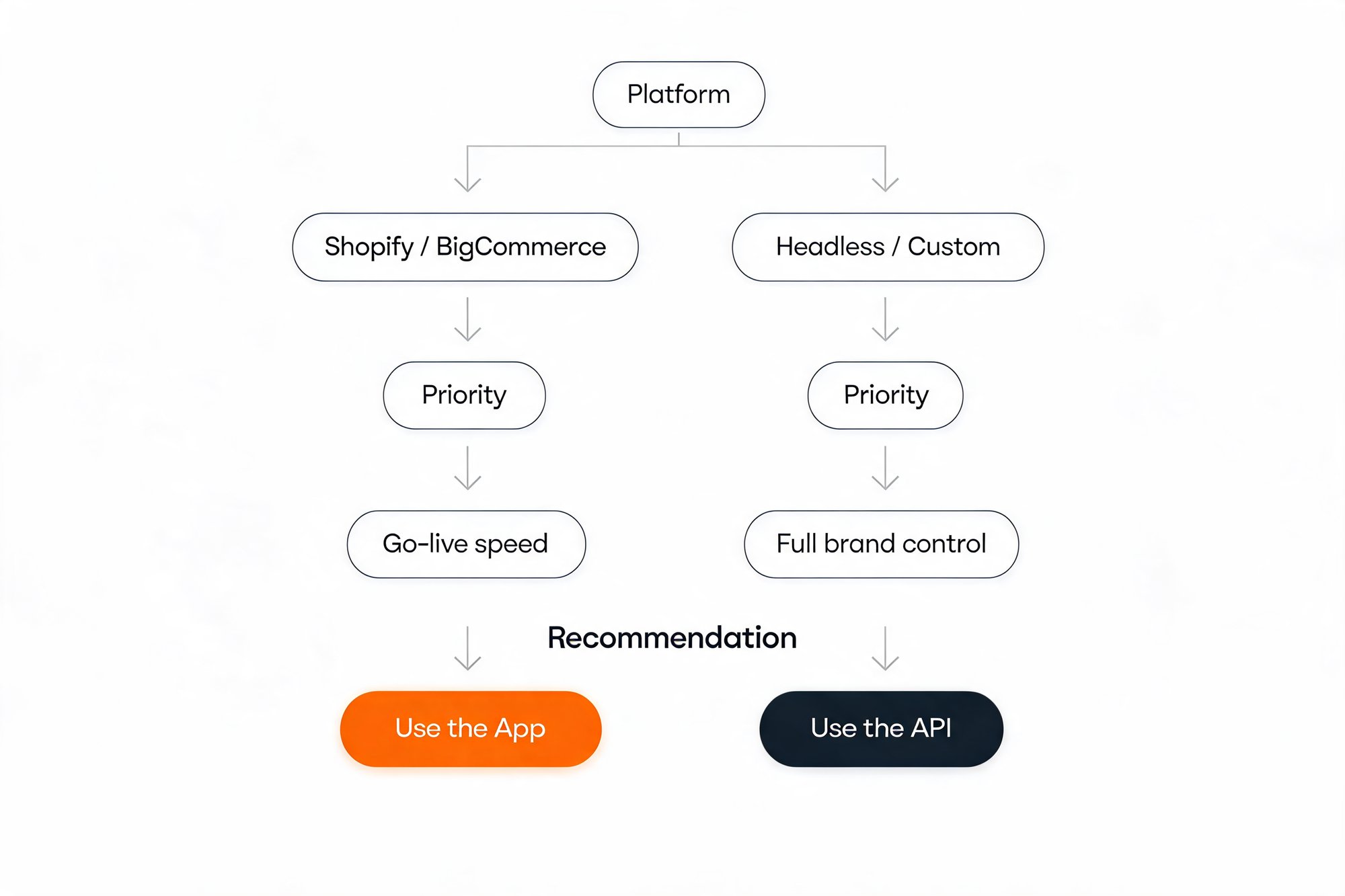
Here's the short version.
Choose the App if:
- You run Shopify, BigCommerce, or another supported platform.
- Going live fast, in days rather than weeks, is the priority.
- You want a branded tracking page and returns portal without writing code.
- Your team has no developer hours to spare for setup.
Choose the API if:
- You run a headless or custom-built storefront (Shopify Hydrogen, commercetools).
- You need to pipe post-purchase data into an ERP, WMS, BI tool, or mobile app.
- Pixel-perfect brand control over the tracking experience is non-negotiable.
- You have one or two developers who can own the integration.
For roughly 90% of merchants on a standard platform, the app is the right call. The API earns its keep when your stack or your brand standards outgrow what a no-code product can deliver.
Understanding the Core Trade-Off: Simplicity vs. Control
Strip away the technical labels and this is a strategic choice, not a technical one: the classic build-versus-buy trade-off. The app is a finished product. The API is a set of building blocks.
Think of it like housing. The AfterShip app is a high-quality prefabricated home: designed, built, and ready to live in within days, with rooms you can repaint and furnish to your taste. The API is hiring an architect to build custom from the foundation up. Every wall sits exactly where you want it, but you supply the builders, the timeline, and the upkeep.
Both paths deliver the same core capabilities: tracking, returns, notifications, and multi-carrier shipping software. What differs is who controls the final result and how fast you get there.
The app trades a ceiling on customization for speed and zero maintenance. The API trades setup time and ongoing developer ownership for unlimited control over how post-purchase data looks, lives, and flows through your stack.
So the real question isn't which is more capable. It's whether your priority is speed-to-value or total brand and data control.
The 'Speed & Simplicity' Path: When to Use the AfterShip App
For most Shopify and BigCommerce merchants, the app isn't the compromise option. It's the smart default.
Our Shopify integration installs the app, connects your store, and publishes a branded tracking page the same day. No developer ticket, no sprint planning, no staging environment. Your engineers stay focused on revenue work while your post-purchase experience goes live.
The app is the right path when:
- You run Shopify, BigCommerce, or another natively supported platform.
- You want a branded tracking page and self-serve returns portal built in a visual editor, not in code.
- Speed to value matters more than pixel-level design control.
- Your team is lean and developer time is your scarcest resource.
The no-code editor is where the app proves itself. You set your logo, brand colors, and page layout, switch product recommendations on, and publish, all from a dashboard inside your store admin.
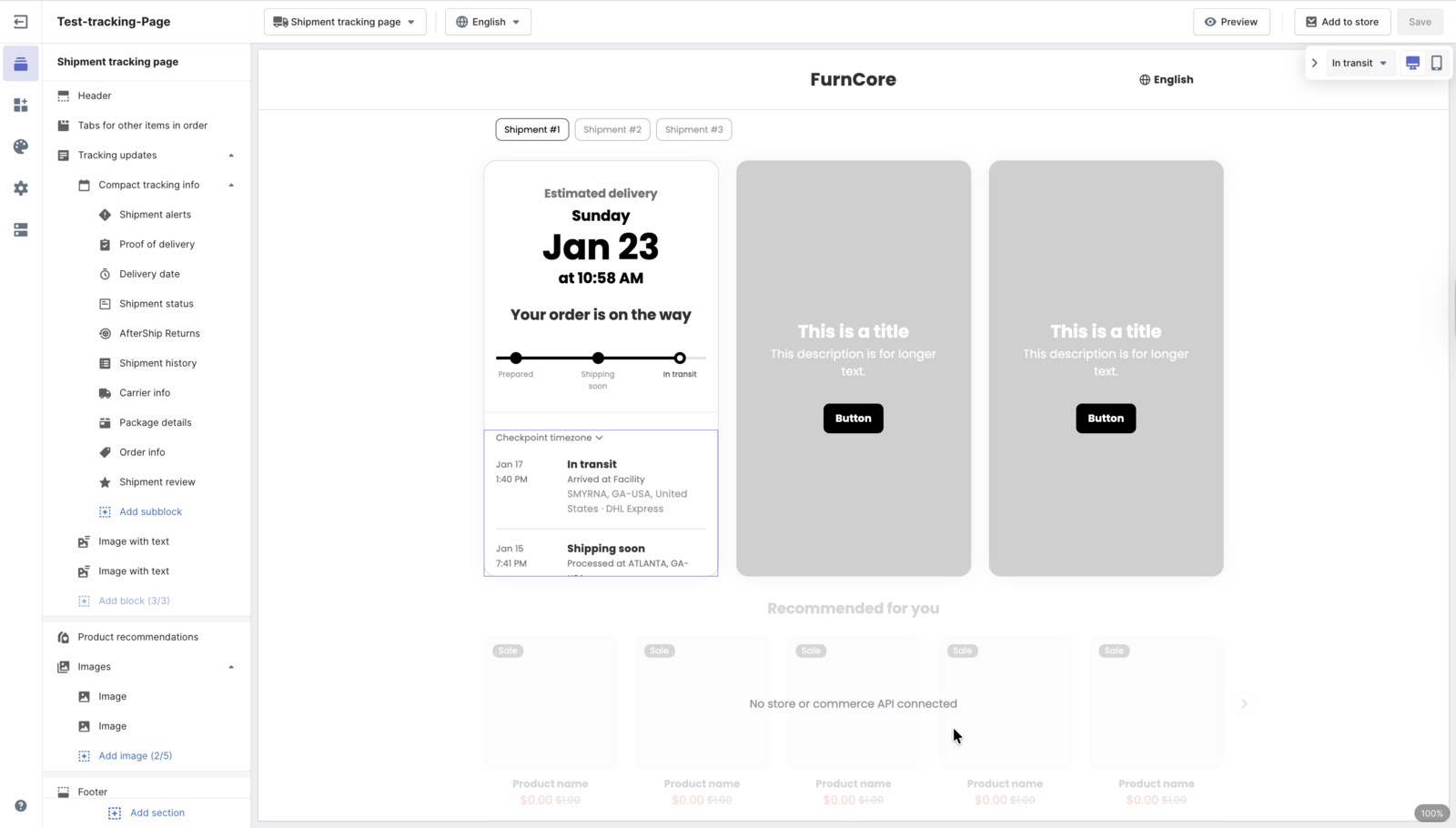
Returns follow the same pattern. You define eligibility windows, return reasons, and routing rules in the dashboard, then hand shoppers a self-serve portal that deflects support tickets automatically. If you also generate carrier labels, AfterShip's shipping app for Shopify adds that in the same no-code way.
The payoff arrives fast: fewer "where is my order?" (WISMO) tickets within the first weeks, not the first quarter. That immediate relief is exactly what a team under pressure to show ROI needs.
“AfterShip enables global marketplaces to launch and operate new markets by removing the complexity of localized logistics and carriers.”
Christos Iosifidis, VP of Product
Read their story →If you're on a standard platform and your tracking page doesn't need to be unique down to the last pixel, stop here. The app delivers the large majority of the value in a fraction of the time.
The 'Control & Customization' Path: When to Use the AfterShip API
Some setups make the API a requirement, not a preference. If any of these describe you, the app alone won't be enough.
You need the API when:
- Your storefront is headless or custom-built, such as Shopify Hydrogen or commercetools. There's no theme for the app's tracking page to live in, so you render the experience yourself.
- Post-purchase data has to flow into other systems: an ERP, a WMS, a mobile app, or the BI tool your ops team reports from.
- Returns logic spans multiple warehouses, with routing that depends on live inventory or capacity.
- Your brand standards demand a tracking experience indistinguishable from the rest of your site.
The common thread is integration depth. The API hands your developers the raw post-purchase data, shipment status, checkpoints, estimated delivery, and returns events, to use in any framework, hosted wherever you choose. Headless commerce has moved from niche to mainstream for fast-scaling brands, and an open API is what keeps post-purchase from becoming the one piece that can't follow.
That control has a cost. Plan for one or two developers to build the integration, and remember that your team, not AfterShip, owns maintenance over time. Your developers can scope the effort against AfterShip's comprehensive API documentation before anyone commits.
Developers also weigh how wide the integration surface is and how responsive support is when something breaks.
If you have the technical resources and a stack the app can't natively reach, the API is the only path that gives you full ownership of the post-purchase experience.
Feature by Feature: A Side-by-Side Decision Matrix
This is the table to paste into your decision doc. It compares the two paths on the five factors an operations or eCommerce leader actually weighs.
| Criteria | AfterShip App | AfterShip API |
|---|---|---|
| Time to Value | Minutes to Hours | Days to Weeks |
| Technical Resources | None (for setup) | 1–2 Developers |
| Brand Customization | High (within pre-set templates) | Unlimited (total control) |
| Ongoing Maintenance | Managed by AfterShip | Managed by your team |
| Data Integration | Limited to built-in partners | Push/pull data anywhere |
Read across any row and the pattern holds. The app trades control for speed; the API trades speed for control. Nothing in this table contradicts that, which is exactly why the choice is easier than it first looks.
Can You Use Both? The Hybrid Approach
Do you have to pick just one? No. The strongest setups often run both, using each for what it does best.
A common pattern looks like this: use the app to build and host your branded tracking page in minutes, then call the Tracking API to feed delivery events into your marketing stack. Push "out for delivery" and "delivered" events into Klaviyo, and you can trigger segmented flows that a no-code setup can't reach, such as a review request the day a package lands or a replenishment nudge timed to consumption.
When does the hybrid approach make sense? When your storefront is standard enough for the app to cover the customer-facing basics, but your data needs run deeper than the built-in integrations reach. You get the app's speed where speed matters and the API's reach where reach matters.
That isn't a compromise. It's the decision tree working as intended: app where it wins, API where it's needed.
Making the Call: A Final Checklist for Your Tech Team
Copy this into an email or Slack message to your developer or agency. Their answers point straight to the path.
Implementation scoping checklist:
- [ ] Our platform is: ______ (Shopify / BigCommerce / Headless / Custom)
- [ ] Our #1 priority is: ______ (Go-live speed / Full brand control)
- [ ] We need post-purchase data in: ______ (Just the tracking page / Klaviyo / ERP / WMS / BI tool)
- [ ] Our available dev resource is: ______ (None right now / 1-2 developers)
- [ ] Our tracking page must be pixel-perfect to our site design: ______ (Yes / No)
Map the answers. Standard platform, speed first, no spare developers, pixel-perfect not required points to the app. Headless or custom, deep data integration, developers on hand, pixel-perfect required points to the API. A mix of the two points to a hybrid build.
With those five answers in hand, the AfterShip API vs app decision stops being a debate and becomes a directive you can hand off with confidence.
Proactive shipment tracking that delights your customers, reduces WISMO tickets, and optimizes your delivery performance.
Book a demo